
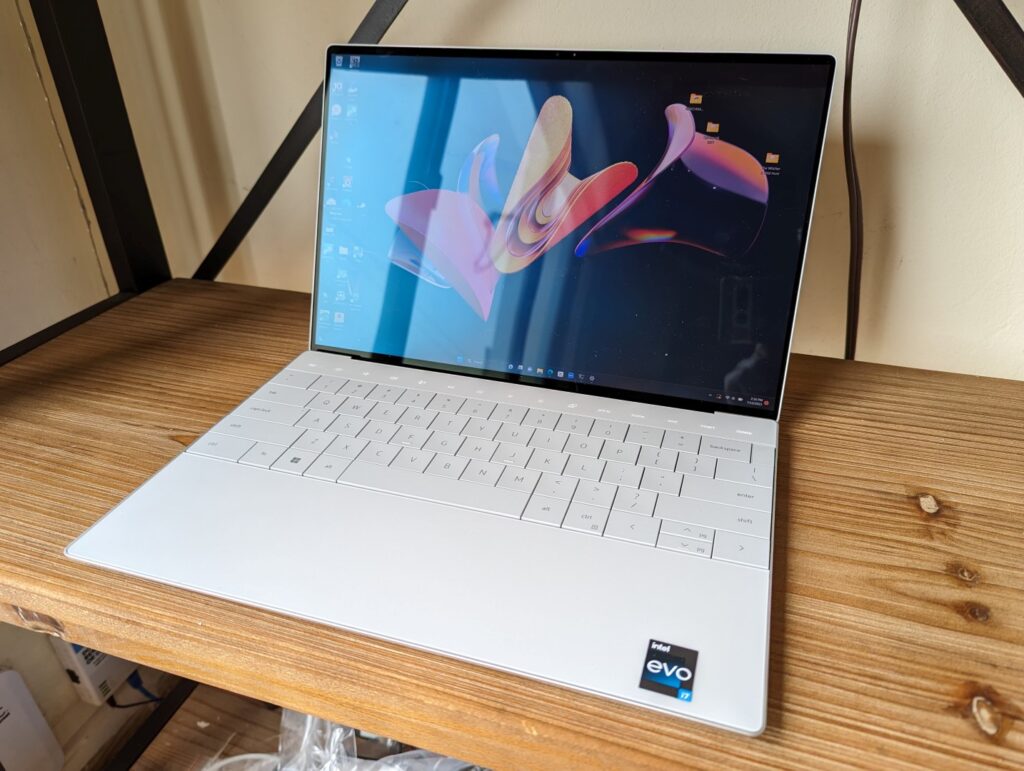
The 2023 XPS 13 Plus 9320 is this year’s refresh to the original 2022 model. It utilizes the same chassis design but with newer 13th gen Raptor Lake CPU options to replace the older 12th gen Alder Lake options. There are otherwise no exterior changes and so we recommend checking out our review on the 2022 model to learn more about the physical features of the XPS 13 Plus.
Our configuration is a midrange SKU with the 13. 4-inch 3. 5K (3456 x 2160) OLED touchscreen and 16 GB of fast LPDDR5 6000 MHz RAM for about $1300 USD.
Other SKUs may come with 1200p or 2400p panels instead, but all are currently shipping with the same Core i7-1360P processor. Alternatives to the XPS 13 Plus include other flagship 13-inch subnotebooks like the Framework Laptop 13. 5 , HP Spectre x360 13.
5 , or the Lenovo ThinkPad X13 G3 . More Dell reviews: There are no changes to the 1 MP webcam whereas some competing models like the HP Spectre have already moved on to higher quality 5 MP sensors. Four display options are available as follows: Our OLED configuration utilizes the same Samsung 134XK04 panel as found on last year’s OLED SKU and so the viewing experience remains identical.
Owners are getting 99 percent sRGB coverage at a minimum no matter the option selected based on our experiences with all three resolution options . Pulse-width modulation or flickering is still present on most brightness levels. We’re able to detect a frequency of 238.
6 Hz from 0 percent to 52 percent brightness and 60 Hz from 53 percent brightness to maximum. The alternative IPS options are not expected to have any flickering or PWM. We set our unit to Ultra Performance mode via the redesigned MyDell software prior to running the benchmarks below.
MyDell is the XPS equivalent to the Optimizer software that ships with many Latitude models and so it integrates similar features like performance profiles, charging habits, and Presence Detection. The Dell power profiles can conveniently sync with the standard Windows profiles unlike on most other laptops. Multi-thread performance from our 13th gen Core i7-1360P is nearly identical to the 12th gen Core i7-1280P in the 2022 XPS 13 Plus.
Even their Turbo Boost behaviors are the same as exemplified by the CineBench R15 xT loop test results below. The Lenovo Yoga 9 14IRP G8 , which ships with the same Core i7-1360P, is able to sustain slightly faster Turbo Boost clock rates for longer under the same test. While multi-thread performance hasn’t really changed year-over-year, single-thread performance is up by roughly 10 to 15 percent over the Core i7-1280P.
This isn’t expected to have much of an impact on daily workloads, however, as most modern applications are multi-threaded. PCMark results are just slightly but consistently ahead of last year’s XPS 13 Plus by single-digit percentage points likely due to the faster RAM and slightly faster single-thread performance. Our unit would exhibit latency issues when opening multiple browser tabs or homepage even after multiple retries.
4K video playback at 60 FPS would be imperfect as well with 10 dropped frames during our minute-long test video. This could potentially be a bug with the new 2023 model as none of our three 2022 test units showed these problems. The SSDs in the XPS 13 Plus series may be sourced from Samsung, Micron, or Western Digital.
For this particular unit, our SSD is the Samsung PM9A1 PCIe4 x4 offering sequential read and write rates of almost 7000 MB/s and 4000 MB/s, respectively. Unfortunately, the performance of our drive would throttle to as low as 2000 MB/s when stressed as shown by our DiskSpd loop test results below. Repeat testing would not result in any improvements.
In contrast, the same drive in our 2022 XPS 13 Plus would not exhibit any performance throttling at all. We’re unsure of any specific causes as there have been no changes to the SSD heat spreader as far as we can tell. The Iris Xe 96 EUs remains the fastest integrated graphics solution from Intel despite it being a couple of years old.
This year’s version is slightly faster than last year’s by a few percentage points due to the small uptick in memory clock rate, but it still pales in comparison to the competing Radeon 680M or 780M . Though there are no changes to the cooling solution or fan noise levels, we’re able to notice a slight coil whine from our test unit when placing an ear near the keyboard keys. The fans are otherwise idling or just barely audible under most light loads like web browsing or word processing.
Surface temperatures can be very warm due to the thin profile, Core-P CPU, and lack of any ventilation grilles on the bottom panel. Hot spots can reach up to 45 C compared to just 35 C on the slower HP Dragonfly Folio 13. 5 G3 .
When stressed under Prime95, the PL2 and PL1 limits of the Core i7-1360P are exactly the same as what we observed on last year’s Core i7-1280P-powered XPS 13 Plus at 64 W and 34 W, respectively. Clock rates would boost up to 3. 6 GHz for the first second or so before falling and eventually stabilizing at 2.
3 GHz and 90 C. The very warm CPU temperature is partly responsible for the high surface temperatures mentioned above. Running on batteries does not impact performance.
A 3DMark 11 test on battery power would result in essentially the same scores as on mains. Idling on desktop can draw between 6 W and 14 W which is a wider range than on most other subnotebooks due to the more demanding OLED display. As detailed in our article here , certain colors will demand more power on an OLED panel whereas power consumption is independent of color on IPS.
Overall power consumption is otherwise similar to last year’s model despite the newer generation CPU. Running Prime95, for example, would demand about 63 W from each system meaning the performance-per-watt benefits of the 13th gen Core i7-1360P are not any better than on the 12th gen Core i7-1280P. Runtimes are nearly identical to last year’s Core i7-1260P configuration at about 7.
5 hours of real-world browsing usage. Charging from empty to full capacity with the included adapter takes a little over 2 hours. The XPS 13 Plus design was introduced just last year and so this year’s refresh is expectedly minor.
It would be unrealistic to assume any dramatic updates to the chassis or internals at this point in time, but the 2023 refresh is unfortunately forgettable considering that it barely offers any advantages in terms of processor performance or performance-per-watt over the previous year. Furthermore, other aspects seem inconsistent such as frame skips during video playback and the throttling SSD. All the main advantages and disadvantages of the original XPS 13 Plus 9320 still apply to the 2023 version.
The 13th Core i7-1360P feels like a rebrand of the 12th gen Core i7-1280P. Interested buyers may want to consider the original 2022 XPS 13 Plus 9320 instead of the newer 2023 version as a result. If you’re in the market for the XPS 13 Plus 9320, then we recommend the original 2022 model as it is less expensive with essentially the same performance as the 2023 iteration.
Buyers can instead invest the saved dollars on more tangible features like more RAM, more storage, or a higher resolution display. Dell is now shipping the XPS 13 Plus 9320 starting at $1150 USD for the base FHD configuration configuration up to $1750 for the 4K UHD configuration. .
From: notebookcheck
URL: https://www.notebookcheck.net/Barely-any-better-than-the-previous-year-2023-Dell-XPS-13-Plus-9320-Core-i7-1360P-review.733651.0.html