
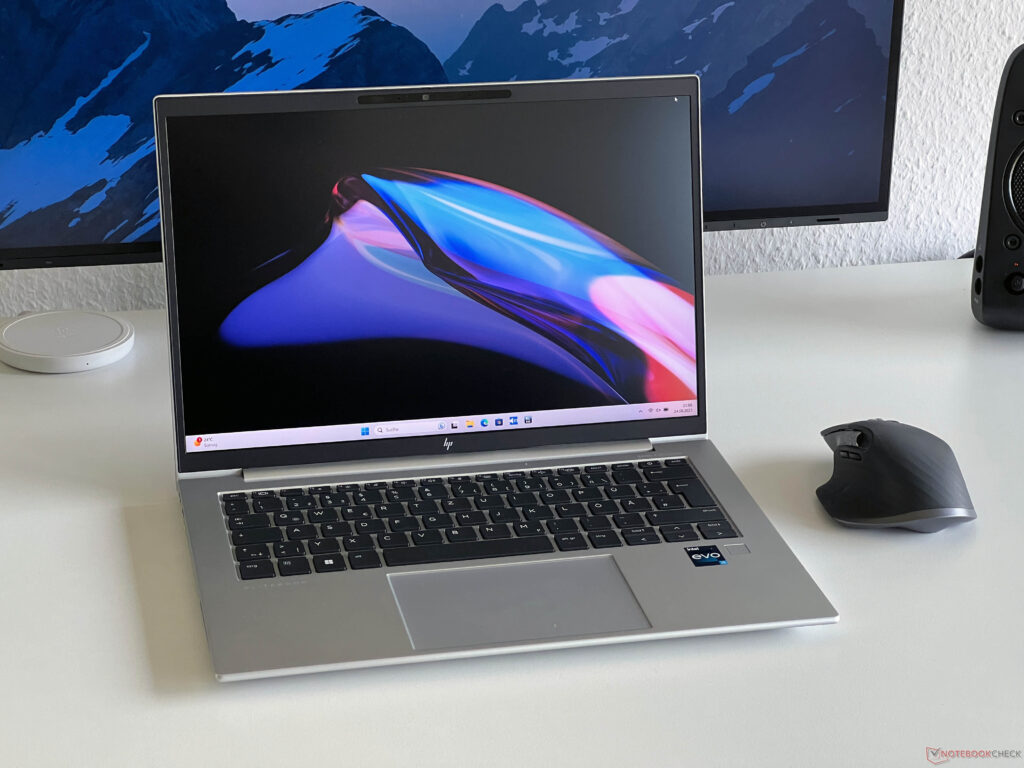
The EliteBook 1040 G10 is the business flagship from HP. In terms of its price, it positions itself even above the EliteBook 845 G10 that we tested recently. This makes it the direct competitor to Lenovo’s ThinkPad X1 Carbon G11 , which is also exclusively available with Intel CPUs.
HP has equipped its high-end laptop with extensive security features and a magnesium case. In addition, there are many different configuration options with Intel’s current U or P series CPUs. Costing 1,669 Euros (~$1,785), our test unit is one of the most affordable EliteBook 1040 G10 versions.
For this, you get the low-power 1080p display with 400 Nits, a Core i5-1335U , 16 GB of RAM, a 512-GB SSD, and an LTE modem. In HP’s Campus program, this version is already available for 1,379 Euros (~$1,475). The basic design of the EliteBook 1040 G10 is no different than other EliteBooks, such as the 845 G10 that we recently tested.
The silver color laptop looks elegant, with the black keyboard and dark display bezels offering a nice contrast. Particularly on the sides, the display bezels are comfortably small, and even though they are slightly wider on the top and bottom, there is no camera bulge like in several other business competitors. This compromise is okay for us, and the laptop design doesn’t look aged at all.
Compared to the aluminum case of the EliteBook 845 G10, the surfaces feel minimally rougher and slightly warmer. But fingerprints and dirt are no larger problems here either. The stability is very good, with both the base unit and display lid being very stiff and resistant to warping.
In the direct comparison, we don’t see any differences to the EliteBook 845 G10, so the display lid can also be pressed in when it is closed. However, we are still unable to provoke any response from the display in this way even with a lot of pressure. The maximum opening angle is around 170 degrees, and the central hinge is well adjusted.
The case of the 1040 G10 is slightly less wide than that of the 845 G10 but a little deeper instead. The height of both models is the same. But the magnesium case has a positive effect on the weight, which is exactly 1.
3 kg (~2. 87 lb), so around 160 grams (~5. 6 oz) less than the 845 G10.
The ThinkPad X1 Carbon uses the same footprint, while being slightly slimmer and also lighter. The included charger adds almost another 300 grams (~10. 6 oz) to the weight.
Optionally, the laptop is also available with a smaller 38-Wh battery, which would reduce the weight by about 100 grams (~3. 5 oz). Most of the connections of the EliteBook 1040 G10 are placed on the left side of the case.
The two USB-C connections support Thunderbolt 4 and can therefore also be used comfortably to connect a docking station. As a business laptop, the device also offers a SmartCard reader, but there is no SD card reader. The EliteBook 1040 G10 includes a modern WLAN module from Intel (AX211) that also supports modern 6-GHz networks (Wi-Fi 6E) and Bluetooth 5.
3. In the test with our Asus reference router, the transfer rates are very high, and there are also no problems at all in regular usage (including some large downloads) during the testing period. Our test unit is equipped with a WWAN module from Fibocom (860-GL-16) for 4G/LTE connections.
In addition to a Nano-SIM card, you can also use an eSIM, and optionally, the EliteBook can also be equipped with a 5G module from Intel. The top edge of the display bezel contains a 5-MP camera that records decent images and also includes a mechanical shutter. Particularly in terms of the image sharpness, there are some visible advantages compared to the regular 720p or 1080p models, and you also won’t need an external webcam to achieve a good quality.
In addition, there is also an IR camera, allowing you to use face recognition via Windows Hello. In addition to several Philips screws, the bottom of the case is also held by several plastic clips, some of which are fastened very tightly. So you have to be very careful not to damage them when removing the case bottom.
Inside, you get access to the battery, the fan, the two communication modules, and the M. 2 SSD, as well as the two slots for the working memory. There is an additional cover for the SSD and RAM, but this is only slotted in and can be removed easily.
Overall, the maintenance options are good. HP uses an illuminated chiclet keyboard that offers a very comfortable typing experience. As already in the EliteBook 845 G10 , the stroke is very precise and also not too short.
Compared to the keyboard of the ThinkPad X1 Carbon G11 , the characteristics are fairly similar, but we like the keyboard of the EliteBook even slightly better. The keyboard layout doesn’t pose any surprises, only the arrow keys and integrated power button at the top right aren’t quite optimal. The fingerprint scanner is located on the right below the keyboard.
HP hasn’t included a point stick in its business models for a while, but the ClickPad works really well. At 12 x 8 cm (~4. 7 x 3.
1 in), it is sufficiently large, and the sliding characteristics are very good. We didn’t encounter any problems with pointer movements or gestures (with up to four fingers) at all during the test. You can also click on the bottom half of the pad, which produces a muffled clicking noise that gives a high-quality impression.
HP offers various displays for the EliteBook, starting with a 250 Nits IPS display and the SureView panel with 1000 cd/m² including an integrated privacy filter, although we wouldn’t recommend that due to the weak subjective image quality. Our test unit uses the matte low-power FHD panel (1,920 x 1,200 pixels, 16:10), which is advertised with a brightness of 400 cd/m². The subjective image quality is good, since the contents are displayed sufficiently sharp and even bright contents aren’t grainy, although the colors could have been slightly more vibrant.
Both the brightness and the color temperature can be adjusted automatically via sensor. In our measurements, the test unit fails to reach the advertised brightness of 400 cd/m² by a significant margin, since we measure a maximum of 343 cd/m² and an average of 330 cd/m². The black value is very low at 0.
19 cd/m², resulting in a very good contrast ratio of 1,800:1. Light halos aren’t any significant problems, and we also didn’t notice any PWM flickering. However, the response times are fairly slow, and we also see some ghosting effects with movements.
The analysis with the professional CalMAN software shows a slight blue tint in connection with a color temperature that is slightly too cool. There are also some deviations in the colors, but we are able to bring the color reproduction to reference level with minimal deviations using our own calibration (you can download the profile for free from the link above). However, the sRGB color space is only covered to barely 90%, so the competitors do better here.
While this is a decent panel overall for the office, it is still slightly disappointing considering the high price. Of course, the matte display benefits outdoors, and you can work outside comfortably on cloudy days. However, the brightness is insufficient on sunny days.
The viewing angle stability of the IPS panel is good, and there are merely some brightness increases looking from the sides above. HP doesn’t offer any separate power profiles, but the regular Windows power profiles are used instead. We ran the following benchmarks and measurements using the Best Performance profile.
Our test configuration of the EliteBook 1040 G10 is equipped with the Core i5-1335U , which is the weakest processor for this model. It is a current Raptor Lake processor of the U series with two Performance and eight Efficiency cores. Even though the nominal TDP of the U series lies at 15 watts, the processor is allowed to consume a maximum up to 52 watts here.
However, this value cannot be maintained and immediately drops, before it levels out at only 15 watts after a short time. Correspondingly, the results are only good under short load, while the performance drops massively under constant load. But the single-core performance is still decent, and the performance is also good for everyday office tasks overall – although the competitors are overall faster.
In battery operation, the maximum consumption is 45 watts, but only 15 watts after a few seconds. This causes the multicore performance to drop by about 26%, and the single-core performance is also affected (-10%). You can find additional CPU benchmarks in our technical section .
Thanks to its modern processor and NVMe SSD, the subjective performance impression of the EliteBook 1040 G10 is very good, and all inputs are implemented without any noticeable delays. In the synthetic benchmarks, it becomes noticeable that it uses only a Core-i5 processor, and most competitors achieve slightly better results. However, this shouldn’t matter at all with everyday office work.
In our standardized latency test (with surfing in the Internet, playing a 4K YouTube video, and CPU load), our test unit shows some slight limitations for using real-time audio applications. Our test unit is equipped with the 512-GB version of Samsung’s PM9B1 SSD. Even though this is a PCIe 4.
0 drive that is also connected via PCIe 4. 0, the overall performance is more at a PCIe 3. 0 level with maximum transfer rates of about 3.
5 GB/s. While more should be possible here theoretically, the drive is still fast enough in practice. After starting the laptop for the first time, there are still 415 GB of storage available to the user.
You can find additional SSD benchmarks in our technical section . The graphics are handled by the well-known Iris Xe Graphics G7 from Intel, but in combination with the Core i5, this is only the slower version with 80 EUs. The Core i7 CPUs are equipped with the faster iGPU version with 96 EUs.
At this point, the Xe Graphics G7 has already been on the market for a while, and although its performance is sufficient for everyday office tasks and playing high-resolution videos, it is very low overall. This also becomes noticeable if you want to play some games afterhours, since you will then usually be limited to low or medium details. Current and more demanding games, on the other hand, won’t run smoothly at all.
Under constant load, the graphics performance doesn’t remain stable, dropping by about 10%. On the other hand, the performance remains stable in battery operation. You can find additional GPU benchmarks here .
The EliteBook uses a single fan, which should really be completely sufficient for a U series processor. However, the very high power limit of more than 50 watts for a short time also becomes noticeable here. The two Performance cores reach a very high clock speed with this, which also leads to very high temperatures.
This also leads to the fan quickly turning on even during short load peaks, which is even the case in all the performance modes. In the extreme case, this leads to a maximum fan noise of more than 40 dB(A), which is too high considering the performance. But since the performance drops quickly, the fan noise also decreases during the stress test, varying in the range between 31 and 35 dB(A).
The fan can also turn on occasionally during everyday operation, for example when several browser tabs are active. We would have preferred, if HP could have optimized the performance modes more here, limiting the power consumption in the more efficient modes. The most you can do now, is make some manual adjustments.
Our test unit does not produce any other electronic noises. The surface temperatures remain unproblematic at all times. During idle operation and under low load, the business laptop hardly warms, and even under maximum load, we measure a maximum temperature of 45 °C (113 °F) in the central rear area at the bottom.
With that, you should always be able to run the EliteBook on your lap. During the stress test with a combined CPU/GPU load, the processor shows the same behavior as under pure CPU load. Initially, the power consumption quickly jumps to more than 50 watts for a short time, but then also drops again just as quickly.
After a few minutes, the consumption levels out at barely above 15 watts, remaining at that low level afterwards. The sound system consists of four speakers that also produce a decent sound, especially for an office laptop. However, competitors such as the ThinkPad X1 Carbon G11 and particularly also high-quality subnotebooks such as the MateBook X Pro do even significantly better here.
During idle operation, the power consumption values are very low at a maximum of 6. 3 watts at full display brightness. However, under load the high power limits become initially noticeable.
In the stress test, the 65-Watt charger even quickly hits its limits, but then the consumption quickly levels out at around 30 watts. The 51-Wh battery allows for a good battery life, although several competitors like the ThinkPad X1 Carbon G11 even surpass that. At an adjusted brightness of 150 cd/m² (corresponding to 70% of the maximum brightness in our test unit), our WLAN test runs for almost 10 hours, and almost 8 hours at full brightness.
In the Video test (also at 150 cd/m²), it even lasts for almost 13 hours. It takes around 2 hours for a complete recharge with the laptop turned on, with a 50% charge level being reached after 34 minutes. If you choose the optional WQHD panel, the battery life will be reduced, which you can also see with the EliteBook 845 G10 .
The EliteBook 1040 G10 is at the tip of HP’s business lineup, but our test unit is unable to fulfil this role in practice. First there is the fact that the current Core i5 processor is not particularly fast, but this you already know if you decide for this model. But then it is incomprehensible why HP would allow the processor to consume up to 52 watts in all the performance profiles.
This will lead to fan activity in everyday operation, which otherwise wouldn’t have to be the case. However, the system performance is still decent in everyday office operation. The case has a high quality, and the input devices are very good.
In addition, there are good maintenance options, and optionally a WWAN module for mobile Internet (4G or 5G) is also available. However, the low-power display remains slightly behind the expectations, since the advertised brightness is clearly missed, and the slow response times are noticeable in everyday operation. While there is an option for a WQHD panel with 500 Nits and 120 Hz for the EliteBook 845 G10 , this is not the case for the 1040 G10 according to the data sheet.
The HP EliteBook 1040 G10 offers a high-quality magnesium case, extensive security features, and modern connections. But despite its high price, the other characteristics aren’t really convincing, and the EliteBook 845 G10 is the better choice overall. In our opinion, the strongest competitor for the EliteBook 1040 G10 is the EliteBook 845 G10.
Although it is 160 grams (~5. 6 oz) heavier, it offers the faster AMD processors and optionally also a superior display. We currealso ntly have a weaker version with the Ryzen 7 7840U and 400-Nits display in our test and can already tell you that the power limits are better adjusted there and the runtimes in the WLAN test turn out 2-3 hours longer.
The ThinkPad X1 Carbon G11 also offers some advantages in terms of the performance and battery life. The customizable EliteBook 1040 G10 is available directly from HP’s online shop starting from $1,250 . Some configurations are also available on Amazon, such as a WUXGA version for ~$1,740 .
.
From: notebookcheck
URL: https://www.notebookcheck.net/HP-EliteBook-1040-G10-laptop-review-HP-s-response-to-the-ThinkPad-X1-Carbon.747812.0.html