
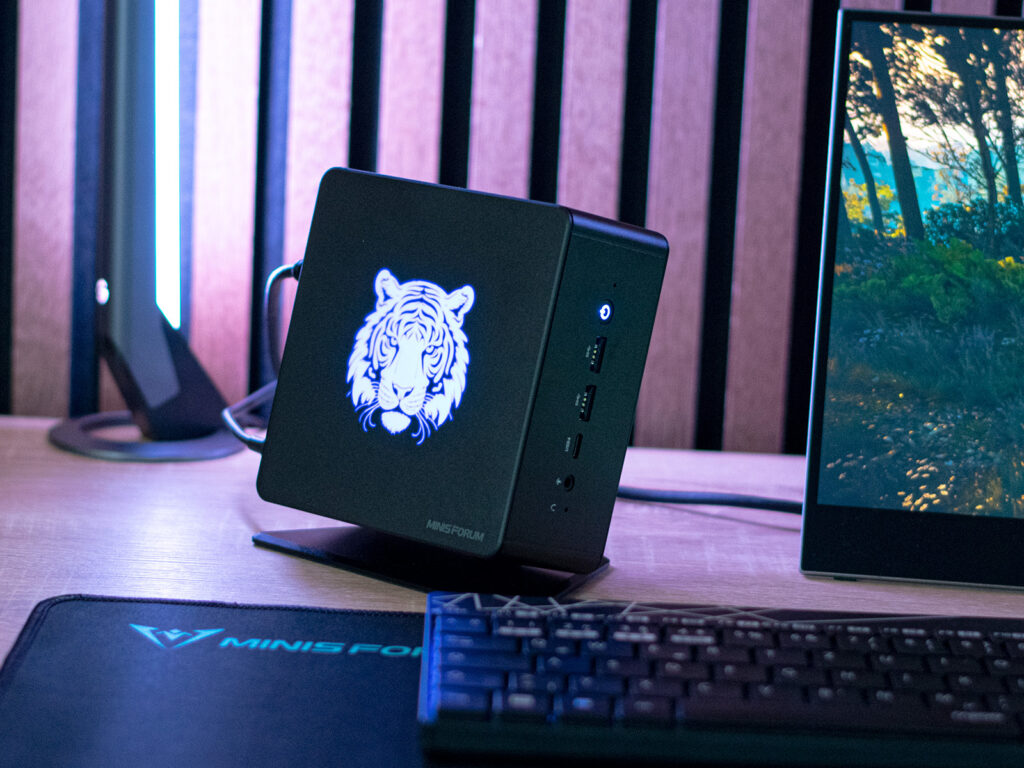
The Minisforum EliteMini UM780 XTX is a powerful mini PC which masters a whole load of tasks. As a result of its design, we would recommend the PC as a high-end multimedia device, as its RGB lighting might be a little inappropriate for everyday office use. Its AMD Ryzen 7 7840HS is an up-to-date SoC from AMD’s Phoenix series.
With 8 Zen 4 cores, it boasts outstanding performance which is supported by its fast DDR5 RAM (5,600 MT/s). Furthermore, our test sample features a speedy SSD with 1 TB of storage. The manufacturer currently sells the device for around US$960, which, in comparison, is a little expensive.
The Minisforum Venus Series UM790 Pro can be found with an AMD Ryzen 9 7940HS and the same storage for much cheaper. Aside from its illuminated tiger emblem, a highlight of the Minisforum EliteMini UM780 XTX is its OCuLink connection, which improves the performance of external graphics cards. More on what exactly this means later.
You can also get the Minisforum EliteMini UM780 XTX as a so-called barebone system, meaning without RAM and an SSD. This version currently costs around US$730. Minisforum also offers a version with 64 GB RAM, which will set you back about US$1,090, making it a true high-end device, at least when it comes to mini PCs without dedicated graphics cards.
In our comparison, the Minisforum EliteMini UM780 XTX faces strong in-house competition. However, other manufacturers offer similarly configured devices which will face our test sample. An overview of all the comparison devices can be seen in the table below.
Visually, the Minisforum EliteMini UM780 XTX looks a little different to the previous EliteMini series models. It looks a little like the Minisforum Venus Series UM790 Pro . Both have the same footprint and are made from a mix of plastic and aluminum.
However, they don’t share the same base. The top of our test sample houses an LED panel with an illuminated tiger logo. Other motifs aren’t included with the device.
An important point about this is that the lighting automatically switches between blue, red and green in 5-second intervals. Although you can completely deactivate this within the BIOS, you aren’t able to change it to different colors or even change the speed at which it changes. The Minisforum EliteMini UM780 XTX is immaculately built.
Its plastic lid is connected with a magnet and can be easily removed. The bottom is also made from plastic and is fixed to the rest of the case using four screws. Thanks to its high-quality metal surfaces, the PC feels very nice.
As a result of its material choice, the Minisforum EliteMini UM780 XTX offers great stability. The mini PC can either be placed on your desk, or you can use the supplied VESA mount to fix it to your monitor, for example. It also includes a stand, which allows you to position the device vertically as well.
This saves a bit of space and if you wish, you can turn the mini PC into a visual highlight of your desk set-up. At 750 grams, the Minisforum EliteMini UM780 XTX weighs a little more than the Minisforum Venus Series UM790 Pro . If you use the stand, then you’ll have to factor in an additional 125 grams.
Its new 120-watt power supply is considerably lighter and now only weighs 278 grams (compared to the previous 450 grams). The Minisforum EliteMini UM780 XTX can currently be found in three colors. This includes black, which is the color of our test sample, Champagne Gold and Azure.
The colors only correspond to the device’s metal surfaces. The case lid and bottom are always black. The Minisforum EliteMini UM780 XTX has been given lots of connectivity options, spread out between the front and back of the device.
Four USB Type-A ports are pretty standard and should generally be enough. It also features four USB-4 ports which can be used in a variety of ways. In combination with the Razer Core X, you can also connect external graphics cards using this connection.
We took a look at how well this works and compared it to other devices. One new port on the Minisforum EliteMini UM780 XTX that is also meant for external graphics cards is the OCuLink connection. The PC’s scope of delivery includes an M.
2 adapter which can be installed if needed. As a result, the device will only have space for one storage device. The OCuLink connection also has access to a higher bandwidth compared to USB 4, meaning you should be able to achieve higher frame rates in connection with a dedicated graphics card.
Unfortunately, Minisforum itself doesn’t offer any accessories for this use. It does, however, offer the GPD G1 , which uses this new port natively. Screens can be connected via HDMI or DisplayPort.
In addition, both USB-4 ports support image output. As a result, this means you can connect a total of 4 displays to the Minisforum EliteMini UM780 XTX at once — the same as on the Minisforum Venus Series UM790 Pro . The Minisforum EliteMini UM780 XTX has received an Intel Killer Wi-Fi 6E AX1675x (210NGW) WLAN module.
In general, this is good enough for everyday use, however, in comparison, our test sample couldn’t keep up with the comparison devices. We performed our test using the Asus ROG Rapture GT-AXE11000 as a test router. The Minisforum EliteMini UM780 XTX also gives you the choice to use a wired connection for faster speeds.
The manufacturer has actually even installed two ports for this and they allow speeds of up to 2. 5 GBit/s. The device’s scope of delivery includes a 120-watt power supply and a mounting plate to attach the PC to a monitor (VESA mount).
If you wish to use the device in an upright position, then you can use the metal stand. All the required materials for the VESA mount and the stand are included in the package. Furthermore, you will receive an HDMI cable, a short instruction manual as well as an OCuLink adapter which can optionally be installed.
The Minisforum EliteMini UM780 XTX can be opened up relatively easily from the top. The lid is held on magnetically. In order to access further components, you’ll have to first remove the LED module which is held on with four screws.
This also includes an active cooler that cools the storage device. You just need to be careful taking it apart as it has quite a short cable. RAM and SSD components can then be installed easily if you have purchased the Minisforum EliteMini UM780 XTX as a barebone system.
In our case, we only had one free M. 2 slot, which we used to plug in the OCuLink adapter. If you need to clean the CPU cooler, then you’ll have to take out the entire circuit board.
If you are careful, you can do so, although the manufacturer strictly advises against this. According to the device’s specs, it uses liquid metal to ensure the best heat dissipation. Minisforum has equipped the EliteMini UM780 XTX with an AMD Ryzen 7 7840HS .
The SoC, which is based on Zen 4, features 8 cores and 16 threads. With 32 GB DDR5 RAM and a fast SSD, even demanding tasks are no issue for the mini PC. There are currently no alternative configurations of the device.
A more affordable model with an AMD Ryzen 5 7640HS would be a suitable alternative. We ran all performance tests using the energy profile “balanced”. The SoC’s performance was not changed.
The iGPU was given access to 4 GB RAM. The Minisforum EliteMini UM780 XTX’s AMD Ryzen 7 7840HS is a very powerful processor. The modern SoC made by AMD features 8 cores and 16 threads, and is part of the Phoenix series based on Zen 4.
Minisforum has forgone to use an AMD Ryzen 9 7940HS for the EliteMini UM780 XTX. In comparison, we noted that our test sample with the presumably slower processor delivered better performance levels, as the Minisforum Venus Series UM790 Pro (which we already tested) is fitted with AMD’s top-of-the-range model. The installed cooling unit seems to be the key factor here and is the reason why the EliteMini UM780 XTX seems to be more powerful.
Even so, the Minisforum EliteMini UM780 XTX couldn’t quite keep up with the Beelink SER7 ‘s performance. However, taking a look at the averaged results shows that there are only six percentage points between the two. You certainly can’t speak of a noticeable performance difference here.
For further comparisons and benchmarks, take a look at our CPU comparison table . In the Cinebench R15 continuous loop, we already noted that Minisforum has installed a powerful cooling system that manages to keep the performance of the AMD Ryzen 7 7840HS stable under load over a longer period of time. With a maximum of 65 watts, the processor’s power consumption is relatively low, although the temperature peaked at 76.
6 °C. When it comes to determined latencies, the Minisforum EliteMini UM780 XTX achieved average results. Our test sample already had to fight increased latencies when opening multiple tabs in Edge.
When playing our 4K test video, these increased further. Beelink manages its latencies much better when surfing the web and playing video with its GTR7 and SER7 . Minisforum has installed a 1-TB SSD from Kingston into our test sample.
The M. 2 model is connected via PCIe 4. 0 x4 and as a result, manages good transfer rates.
Still, the installed model can’t be classed as one of the top models. Even so, the SSD’s performance is more than good enough for everyday use. In order to guarantee stable performance, the manufacturer has installed an active cooling unit which takes care of the storage device.
In our practical test, this worked well. As you can see when looking at the results, the Minisforum EliteMini UM780 XTX, together with both of the Beelink contenders ( GTR7 and SER7 ) and the Intel NUC 13 Pro Kit , was one of the few devices which suffered no performance drops. You can install up to two storage devices into the Minisforum EliteMini UM780 XTX.
However, if you are looking to use the OCuLink connection, you will have to make do with one SSD. For further comparisons and benchmarks, take a look at our comparison table . The AMD Radeon 780M is a powerful iGPU for the AMD Ryzen 7 7840HS as well as for the AMD Ryzen 9 7940HS .
In contrast to Intel’s iGPU solutions, AMD clearly takes the lead. Compared to the AMD Radeon 680M , its performance has been improved ever so slightly as a result of the modern architecture. However, the AMD Radeon 780M can’t live up to a current entry-level GPU such as the Nvidia GeForce RTX 4050 Laptop GPU .
Admittedly, this isn’t a viable comparison, as a dedicated GPU generally offers much more 3D performance. In a direct comparison between the competition, the Minisforum EliteMini UM780 XTX came out on top. Even both of the devices from Beelink had to admit defeat and the device’s in-house competitor, the Minisforum Venus Series UM790 Pro , couldn’t compare to the EliteMini UM780 XTX.
Due to it having been given more RAM compared to the UM790 Pro, the iGPU generally performed better. It is important to note that the possible RAM allocation depends on the size of the installed RAM. With 32 GB, the UM780 XTX now has twice as much RAM as the UM790 Pro.
Further comparisons and benchmarks can be found in our G PU comparison table . Minisforum doesn’t explicitly advertize the EliteMini UM780 XTX as a gaming PC. Even so, the AMD Radeon 780M performs well and can generally run a variety of games.
Of course, the iGPU can’t live up to a dedicated graphics card. This means you’ll have to make a few compromises when it comes to details. If you are looking for a compact PC with a dedicated graphics card, then take a look at the Minisforum HX77G and the Minisforum NUCXi7 .
Alternatively, the Minisforum EliteMini UM780 XTX can be connected to an external graphics card. In order to do so, our test sample offers USB 4 and an OCuLink port. We will be taking a closer look at the latter in a coming review of the GPD G1 with an AMD Radeon RX 7600M XT .
For an overview of how the iGPU performs compared to other graphics cards, take a look at our GPU games list. The Minisforum EliteMini UM780 XTX is equipped with two USB 4 ports, so we’ll also take the opportunity to have a look at its 3D performance in combination with the Razer Core X and an Nvidia GeForce RTX 3060 Ti . In general, the combination works well in everyday use and it worked well in our tests.
However, the iGPU couldn’t make use of its full performance due to the USB 4 port only offering a 40 GBps connection. Nevertheless, its 3D performance could be noticeably increased, as can be seen from the benchmarks. Working together with the external graphics adapter consistently ensures excellent performance — often better than that of its competitors.
Even power-hungry games can now be played with maximum details. The OCuLink port is superior to the USB 4 port due to its higher bandwidth, as it is connected at a speed of 64 GBps. We have now received a test sample of the GPD-G1 GPU, which we will be testing extensively over the next few days.
In one of our next reviews, we will take a closer look at its performance when using the USB 4 port in comparison to the OCuLink interface. Taking a look at Minisforum EliteMini UM780 XTX’s noise emission results shows that it performed well in total. In idle mode, our measuring equipment only showed 28 dB(A), meaning our test sample can compete with the Beelink GTR7 .
However, our test sample never ran completely silently. Under average load, its noise emissions rose a little to 32. 7 dB(A) and we measured a peak of 39.
6 dB(A). This means that the Minisforum EliteMini UM780 XTX isn’t the quietest device in our comparison, however, it is still far from creating annoying levels of noise. The Minisforum EliteMini UM780 XTX’s temperatures only rise by a small amount in idle mode and under load.
We measured a peak temperature of only 37 °C on the bottom of the case. For this test, we used the device without its stand and we placed it flat on our desk. As we previously mentioned, the manufacturer uses liquid metal to optimally lead the processor’s heat to the CPU cooler.
In practice, this works very well, as the processor only hit 76 °C in our test. We noted that the PC only hit its power consumption limit of 65 watts for a short period of time. During the further course, its power consumption levelled out at around 54 watts during the stress test — the manufacturer states this value as being its permanent load value.
At that stage, its temperature only hit 69 °C, which is a very good result indeed. As a result, the manufacturer could have chosen an even more conservative fan curve for full-load use. In idle mode, the Minisforum EliteMini UM780 XTX couldn’t reach the top values of the comparison devices, as its large LED panel also needs to be supplied with power.
However, at 8. 5 to 12. 9 watts, our test device didn’t do too badly at all.
We recorded an average of 67 watts, although it reached a peak of 97 watts. The compact 120-watt power supply had no problems supplying the device with power at any time. The Minisforum EliteMini UM780 XTX stands out with its powerful processor.
The AMD Ryzen 7 7840HS makes you well-equipped for the present and future. With its 8 cores and 16 threads, it delivers great multi-core performance. Thanks to its new Zen 4 architecture, its single-core performance has also greatly improved compared to its Zen 3 predecessors.
Against the expectations that the Minisforum EliteMini UM780 XTX is just a simple upgrade, this mini PC actually features an entirely new design. Admittedly, its LED lighting might not be for everyone, however, with a bit of creativity, you can customize it to suit your liking. If you don’t want cheap-looking bling, then you can also deactivate the lighting.
Aside from its excellent build quality, the Minisforum EliteMini UM780 XTX’s strengths include its perfect connectivity options. In our test, we weren’t missing a single thing and thanks to USB4 and OCuLink, the device is as future-proof as you could wish for. The Minisforum EliteMini UM780 XTX’s CPU performance was impressive — as was its 3D performance.
The AMD Radeon 780M makes for a powerful iGPU for the AMD Ryzen 7 7840HS which clearly performed better than its Intel counterparts. The Minisforum EliteMini UM780 XTX is a mini PC for versatile fields of use. Its modern connectivity options make it super future-proof.
When it comes to emissions, Minisforum has stayed true to itself, delivering very good results. We also welcome its decision to use liquid metal to dissipate heat inside the Minisforum EliteMini UM780 XTX, as we never had any temperature issues. We would rather have seen the manufacturer optimize the fans’ speed under full load.
We never noted any major flaws on the UM780 XTX. If anything, the price is quite a bit higher than similarly configured comparison devices. Of course, our test sample scores points with its OCuLink connection, which we haven’t yet seen on many devices.
However, we don’t see the ability to connect an eGPU as being worth paying the extra money for. Furthermore, the manufacturer doesn’t even offer any in-house accessories, and native eGPU solutions that use this connection currently only include the GPD G1. The Minisforum EliteMini UM780 XTX can be bought directly from the manufacturer for around US$960 .
The barebone model can be had for around US$730. Alternatively, you can find the device on Amazon for US$779. 99 .
.
From: notebookcheck
URL: https://www.notebookcheck.net/Minisforum-EliteMini-UM780-XTX-review-The-mini-PC-with-an-AMD-Ryzen-7-7840HS-and-a-Radeon-780M-has-been-given-OCuLink-and-USB-4-connections.775606.0.html