
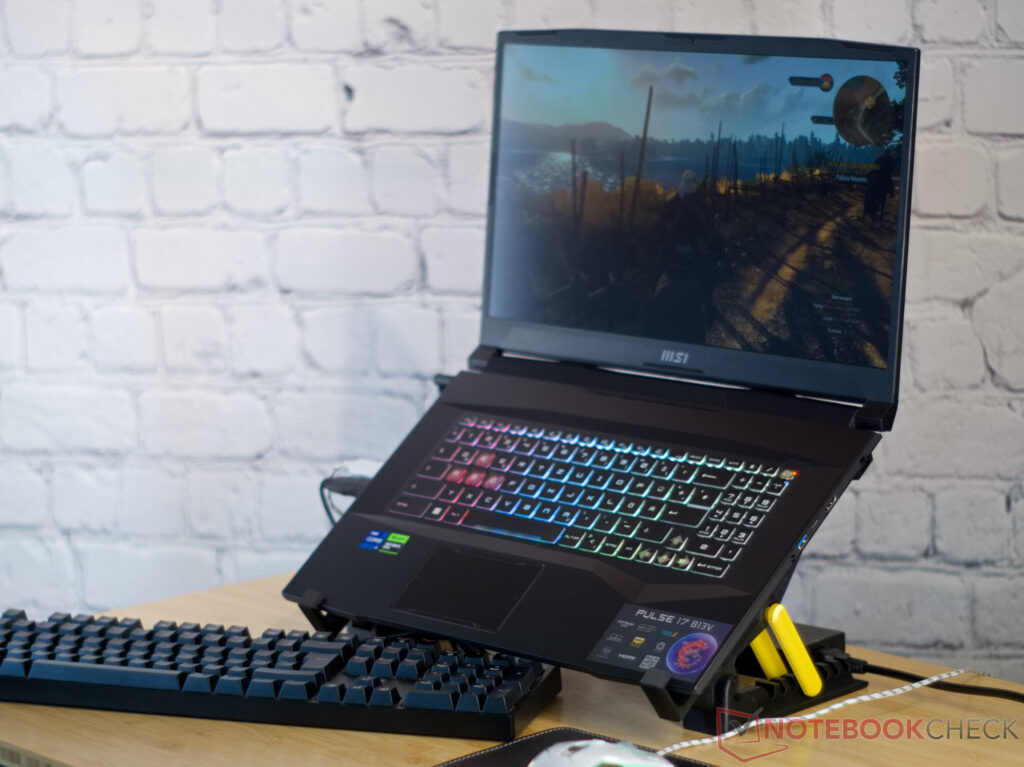
With the MSI Pulse 17, the Red Dragon brings a gaming laptop whose exterior reminds a bit of science fiction. This impression results from the display lid made of anodized aluminum, many edges and corners, and even the honeycomb grid on the bottom of the 17-inch laptop. But inside the laptop run current components, and our test unit is equipped with an Intel Core i7-13700H and Nvidia GeForce RTX 4070 .
When we tested the predecessor in the beginning of the year , the performance of the laptop was convincing. But we also noticed that the Pulse GL76 lacked G-Sync, MUX, Advanced Optimus, and Thunderbolt support. The noise level of the fans in the gaming laptop also gave some reason for complaint.
MSI has now reworked the laptop significantly, introducing many improvements all over, in addition to the new design, chip generations, and cryptic name. With this, the powerful device rises significantly in our ratings. We compare the laptop with the Asus ROG Strix G17 G713PI , the MSI Katana 17 B13VFK , and the Schenker XMG Focus 17 (E23) .
Almost all the current gaming laptops from MSI are designed with a similar concept. Again and again, MSI uses the aggressive lines on the display lid as well as the edgy hinges and the honeycomb pattern on the case bottom. In the Pulse 17, the aluminum display lid is ornamented by some edges that give an additional sci-fi feel to the laptop.
Underneath the lid, the futuristic theme continues with MSI also adding many design elements here. At the same time, the case of the MSI Pulse 17 is quite robust, but the large size of the laptop also means that it is still possible to warp or press in the plastic elements slightly. However, the Pulse 17 presents itself as a solid device overall.
The large display can be opened by 180° and is able to hold its position to some extent. The hinges are almost too easy to move, and some slight vibrations or tapping on the display will already move it a bit. With a weight of 2.
7 kg (~6 lb), the MSI Pulse 17 is the lightweight among its similarly sized competitors. Only the predecessor model weighs less. Aside from that, the current gaming laptops in our comparison differ fairly little in terms of how they fill up the bag.
The fact that the Pulse offers two USB connections on each side is a clever design, allowing both left and right handed users to keep their cables out of the way. One of the USB ports on the right side is a USB-C connection, but unfortunately it only supports data transfer and DisplayPort. With Gigabit LAN and WiFi 6 from the Intel AX201 module, the Pulse 17 isn’t really up to date in terms of network technology.
On the other hand, our test unit shows that high and stable transfer speeds are also possible in the 5-GHz network. The webcam of the MSI Pulse 17 is also anything but modern. It offers HD resolution and produces rather blurry images with strong chromatic deviations at contrasting edges.
Aside from the usual paperwork, a sticker with the red dragon, and the charger for the laptop, we don’t find any additional accessories in the box. One of the 13 Phillips PH0 screws that hold the bottom of the case is protected by a sticker seal in our test unit. Even though MSI emphasizes repeatedly that this is not relevant for the warranty, some vendors might protest if the seal is broken in a warranty case.
When removing the 13 screws, you should also mark their position, since two of the screws are significantly shorter. The bottom cover is also secured by several clips, but those can be opened easily with a plastic prying tool, allowing you to lift off the bottom cover afterwards. Inside the laptop, we find a fairly modular construction, so that the RAM, NVMe SSD, and WLAN/Modul can be replaced quickly.
The battery, speakers, and the board with the two USB connections can also be replaced easily. However, those who regularly like to remove the dust between the fans and cooling fins have to remove the whole cooling system to be able to do this. The laptop also offers a second M.
2 PCIe slot, but unfortunately that is blocked by the battery. So you can probably only install a second SSD with a solution using adapters and cables. MSI offers a 24-month warranty to buyers in Europe.
The MSI Control Center allows you to control the RGB background illumination of the MSI Pluse 17 keyboard. The manufacturer also allows using third-party software to change the colors and effects in the four illumination zones of the keyboard. The transparent W, A, S, and D keys are particularly emphasized here.
The keyboard offers a good haptic feedback and key stroke of about 1. 2 mm (~0. 05 in).
The touchpad of the Pulse 17 is relatively small, but this also means that it doesn’t get in the way of the palms when gaming. With its smooth surface, crisp keys, and high precision, it works well in general. In a gaming laptop, the display should be very responsive, completely cover the sRGB color space, and offer a high contrast.
Of these, only a high contrast ratio speaks for the display of the MSI Pulse. Even though the matte display isn’t particularly bright at an average brightness of 250 cd/m², the low black value ensures the high contrast ratio. The brightness distribution isn’t particularly even, but at least we don’t notice any visible light halos.
This means that the display of the Pulse 17 is significantly worse compared to that of the Pulse GL76 . The response times have almost doubled in comparison, becoming almost 6 times slower at times, and the number of displayable colors has been reduced to almost half. So MSI has performed a significant downgrade of the display.
The AdobeRGB and DisplayP3 color spaces are only covered to less than 40%, and even sRGB isn’t covered to 60% by the Pulse 17. At least, the Calman test shows a good result in the display of the grayscale. However, evaluating the accuracy of the color reproduction with the Calman ColorChecker clearly reveals the limits of the display.
At only 60% of the sRGB color space, the display clearly lacks large parts of the colors, ending up correspondingly far from the color scale in red, green, and blue colors. This results in a maximum color deviation of ΔΕ 21. 22.
This is a very high maximum deviation that isn’t reached by any of our other comparison laptops. But the display fares slightly better in the average color deviations. However, an additional calibration doesn’t change the result, so that even the MSI Katana ends up with lower color deviations using our ICC profile.
The viewing angles of the Pulse 17 IPS panel are fairly stable in terms of the color reproduction, but significantly losing in brightness with increasing angle. When using it outdoors, the laptop is only convincing to a limited extent, since the display isn’t bright enough to be visible in bright sun light. Even in our studio illumination, it becomes quickly clear that the display is rather dark, with the matte surface still showing a relatively large amount of reflections.
The MSI Pulse 17 B13V is available in two equipment configurations that only differ in terms of their GPU. While our test unit uses an Nvidia GeForce RTX 4070 , the other configuration comes with an RTX 4060 . As processor, the Intel Core i7-13700H is used.
It is accompanied by 16 GB of DDR5-5200 RAM and an SSD with a 1 TB capacity. With such a powerful hardware configuration, our test unit is suitable for gaming at resolutions above Full HD. MSI offers three performance profiles and a battery saving mode in the Pulse 17.
In addition, you could also use MSI’s AI mode. When the CPU runs alone, it is able to use a PL1 of 90 watts in Extreme Performance mode, with a powerful boost performance (PL2) of 140 watts. In Balanced mode, PL1 and PL2 are at 70 and 120 watts respectively.
The Quiet Operation mode where the fans are not audible runs at 30 watts without boost. But what is more interesting for a gaming laptop is the performance while gaming. In all three performance modes this hardly differs in the first 10 minutes during our test.
Only the temperatures reach different values. The Performance and Balanced modes ensure constant CPU and GPU temperatures. In Quiet Operation mode, the temperatures rise so high that the performance is throttled, dropping significantly after about 10 minutes.
We therefore decided to run all the generic benchmarks in Performance mode and the gaming benchmarks in Balanced mode. In all our tested games, we also ran an additional benchmark with the highest quality settings in Performance mode. The achieved frame rates differed by less than one percentage point throughout.
This means that Performance mode hardly achieves any FPS advantage when gaming. With six P and eight E cores, the Intel Core i7-13700H in the Pulse 17 is able to handle 20 threads. The processor is provided with a relatively high amount of power and in this way able to place just barely ahead of the other comparison devices with the Core i7.
However, the XMG Focus 17 with a Core i9 and the Asus ROG Strix G17 with a Ryzen 9 significantly surpass the i7 processors. We ran the PCMark 10 benchmark of the system performance twice, since in the first run, the MSI Pulse remained far behind the powerful results the processor was able to show in its benchmarks before. With only 6844 points, it would only have reached last place among our comparison devices.
However, several updates later using Windows Update, the picture changes drastically. The gaming laptop now places just barely ahead of the comparison devices. The only clear outlier occurs in the Essentials section of the benchmark.
We suspect that the fault lies with the relatively slow SSD in our test unit, since the Essentials section places particular emphasis on the access times of data and programs. The CPU-heavy CrossMark paints a similar picture with the comparison devices with Core i9 and Ryzen 9 being able to place significantly ahead. In the DPC latencies, LatencyMon determines that the gaming laptop with the available updates at the time of the test is not suited for real-time processing of audio.
The problem apparently lies in the Windows Kernel here. The Micron 2400 NVMe SSD in our test unit offers a capacity of 1 Terabyte. Its speed is average among the gaming laptops and can also be maintained constantly in the MSI Pulse 17 for longer time periods without any problems.
The Nvidia RTX 4070 is able to run constantly at a powerful 100 to 140 watts in the MSI Pulse 17 without the temperatures in the chip becoming too hot here. With this, the graphics chip delivers a comparatively high performance in the 3DMark benchmarks. This means that Full HD gaming and some slight raytracing shouldn’t pose any problems for the graphics card, and the chip also speedily masters practical applications such as rendering of 3D graphics in programs such as Blender.
The Schenker XMG Focus 17 and Asus ROG Strix G17 have a slight advantage compared to the MSI Pulse 17 here. Both laptops simply offer a faster processor, which is clearly reflected in the frame rates of the CPU-heavy games such as Dota 2 Reborn. However, the Pulse 17 also shows that Full HD gaming and more at high quality settings and even raytracing is possible without going lower than 60 frames per second.
At the same time, the laptop remains significantly quieter than the other competitors, and you can play games here without any drop in performance in Balanced mode at a noise level of only 42 dB(A) (measured from a distance of 15 cm, ~6 in). In the hour-long test with The Witcher 3, the typical FPS range in the day and night rhythm of the game is shown. We don’t see any significant outliers here.
The MSI Pulse 17 is extremely quiet for a gaming laptop. We measure a maximum noise level of only 46. 5 dB(A) under load in the Performance mode, and in the Balanced mode it is even up to 4 dB(A) lower.
The fans are also audible with a delay under load. For example, they only become active shortly before the end of the benchmark in our measurement under average loads with PCMark 06. In our test unit, the surface temperatures of the palm rests remain consistently cool and only barely higher than room temperature.
The maximum temperature of the device is 48 °C (118 °F) and that is spread over large areas at the back edge above and below the cooling system, as well as in the center of the keyboard. However, the temperatures remain within tolerable ranges in the areas important for gaming as well as at the bottom of the high performance gaming laptop. We run the stress test on the almost new MSI Pulse 17.
Apparently, the target temperature of the GPU is around 80 °C (176 °F). As soon as this value is reached, the performance is throttled until the GPU has cooled down a bit. This causes some waves in our log of the stress test with Prime95 and Furmark.
After its short boost phase, the Core i7 runs constantly at around 55 watts. The RTX 4070 repeatedly has to throttle from to 110 watts down to 50 watts. In the later parts of our test of the MSI Pulse 17, the power control of the laptop has stabilized significantly, so that we can assume some learning effect here.
The overemphasized mids make the MSI Pulse 17 sound a bit tinny. However, at up to 85 dB(A), the small speakers are relatively loud and easily able to drown out the quiet fans in this gaming laptop. Those who don’t like the speakers can connect external devices using Bluetooth or the 3.
5 mm audio port. While the maximum power consumption of the Pulse 17 under load is fairly typical for the laptop class, during idle operation and even under moderate loads, our test unit is unusually efficient for a gaming laptop. Corresponding to our measurements of the power consumption, it is also not surprising that the gaming laptop lasts for a long time with its 90-Wh battery in our WiFi web surfing test, reaching almost 9 hours here.
Even under load, the battery lasts for a good 2 hours. On the positive side of the MSI Pulse 17, there are several strong points that speak for the laptop, with an optimal performance of the Core i7 and Nvidia GeForce RTX 4070 foremost. To achieve this, the Pulse doesn’t even need pulsating fans, and the laptop is particularly quiet for its performance class.
Other positive points for the gaming laptop include a decent keyboard and good positioning of the external connections. The battery live is also excellent for a gaming laptop. The Pulse 17 is a gaming laptop that is able to offer a powerful performance at a low noise level.
On the other hand, the device hasn’t quite arrived in the year 2023 in many other aspects. Unfortunately, the laptop also comes with some hefty disadvantages. Aside from the MSI Katana 17, no other gaming laptop in our comparison has such a bad display.
The connection equipment with slow USB 2. 0 and USB 3. 2 Gen 1 ports and 1 GBit/s LAN as well as the lack of 6 GHz Wi-Fi also don’t present the gaming laptop as a high-end device.
But what is really annoying is the blocked M. 2 NVMe port, since the manufacturer could have avoided this in two ways. First, the mainboard and case would have left sufficient space to move the module slightly to the left to give some room for the battery.
And second, the unnecessarily wasted PCIe lanes could also have been invested in a Thunderbolt port. Although compared to the predecessor, the current model now offers G-Sync, MUX, and Advanced Optimus support, it still lacks Thunderbolt. In addition, the display of the predecessor was significantly better according to our measurements.
At street prices starting from 2,150 Euros (~$2,415) at the time of our test, there are many (in parts also significantly more affordable) laptops as alternatives to our test unit. The price you pay the manufacturer for the Asus ROG Stix G17 is at the same level as that of the MSI device from many vendors. Although you have to make some heavy compromises in the battery life with the laptop from Asus, otherwise the Pulse 17 and the ROG Strix G17 are fairly similar in all areas of performance.
On the other hand, the display and connection equipment of the ROG Strix are significantly better. The MSI Pulse 17 B13VGK is only available from few vendors in the US such as Newegg for ~$1963 , with more vendors offering it in the UK , Australia , or Canada , for example. .
From: notebookcheck
URL: https://www.notebookcheck.net/MSI-Pulse-17-B13V-gaming-laptop-review-With-quiet-wings.734671.0.html