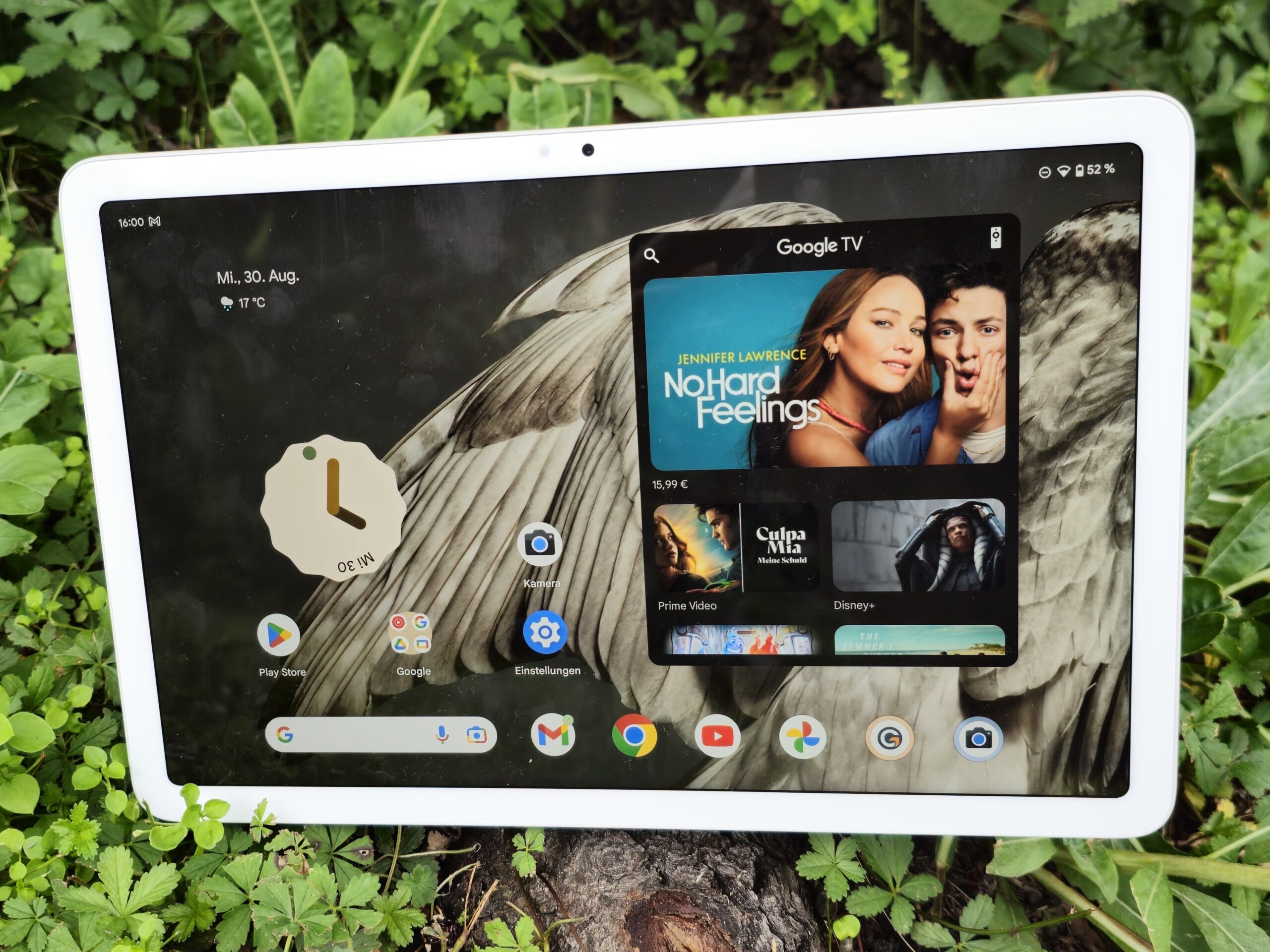

With its Pixel Tablet, Google would like nothing less than to change how tablet lovers use their devices. Tablets are often seen as possible laptop replacements and are offered with a keyboard cover – this is not the case with Google. Rather, the US-American manufacturer is offering a versatile, all-in-one solution consisting of a classic tablet, smart home hub and smart speaker.
This is made possible with the help of a docking station to which the Pixel tab can be attached magnetically and with pogo pins. The tablet itself is equipped with a 10. 95-inch IPS display and the Google Tensor G2 .
The RAM weighs in at 8 GB, whereby the UFS 3. 1 storage can be purchased with either 128 or 256 GB. Unlike the attractive pricing in the USA ($499), the RRP in Germany starts at 679 euros (RRP) including the docking station.
In the EU, the 493-gram Pixel Tablet comes in two colors, beige (Porcelain) and gray (Hazel). The case is made from recycled aluminum, however, the Google Tab doesn’t feel metallic. On the rear of the device, the surface material is matte and has a somewhat velvety feel that is very fingerprint-resistant.
We reckon opinions could split regarding the rear side’s haptics in comparison to glass materials or an anodized aluminum surface. Nevertheless, in terms of the good build quality, there can be no criticism regarding the overall impression made. According to the manufacturer’s data sheet, the front of the Pixel Tablet has an anti-smudge coating, although, no details have been disclosed concerning the implemented protective glass.
It’s worth mentioning that some online stores state the Google tab as having Gorilla Glass 3. The front of the device has a solid 79. 7 screen-to-body ratio.
However, for our taste, the display bezels ought to be a little slimmer. Compared to the Galaxy Tab S8 ‘s almost 84 percent, the Pixel Tablet clearly loses out. Unfortunately, the Google tab doesn’t possess a special certification combating the infiltration of dust or water.
Due to the operating system and some preinstalled apps, our review device’s 128 GB UFS 3. 1 storage possesses an available capacity of 111 GB. Anyone requiring more space for videos or photos can only do so with the help of peripheral devices such as memory sticks or USB OTG since microSD card memory expansion is not possible.
Fast data transfer speeds of up to 5 GBit/s take place via the installed USB 3. 2 port (1st gen) and can, theoretically, also be used to output image signals to external monitors with the aid of an adapter. However, were unable to establish a connection between a monitor and the Pixel Tablet.
Google doesn’t appear to have created the necessary software-related requirements. Despite this, wireless data transfer is available, at least via Miracast. In addition, using the Nearby Share function, information such as photos and videos can be sent from the Pixel Tablet to a nearby Android smartphone.
Ton top of this, the Pixel Tablet has four speakers and three microphones at its disposal, as well as an ultra-wideband chip for accurate distance determination. The tablet can not only be charged via the included dock but can also be switched to a so-called hub mode, turning the device into a smart display. For example, in hub mode, the Pixel Tablet can be used as a digital photo frame or as a control center for your own smart home.
Thanks to Chromecast support, the wireless transfer of music and videos from an Android smartphone to the Pixel Tablet is also possible. During our tests, the Pixel Tablet is based on the current Android 13, including the security patches for August and will receive updates for at least 5 years from the time it is added to the Google Store. However, this only applies to the security patches.
Android version updates are guaranteed until at least Juni 2026 – in other words, three years. With its update guarantee, that means Google remains behind Samsung who promises four generations of Android OS upgrades for its Galaxy Tab S9 models. Similar to the Samsung tablets with their Knox Vault platform, the Pixel Tablet is also equipped with the Titan M2 security chip which is said to protect sensitive user data using machine learning.
Since Google is less focused on productivity, it is understandable that a desktop-style UI, such as the ones seen in Samsung or Lenovo devices, hasn’t been implemented. Despite this, with the Pixel Tablet it is possible to switch quickly between multiple user accounts via the Android menu or lock screen which, in turn, also fits better to the docking concept. The Pixel Tablet uses the MIMO process, in order to ensure first-class reception.
However, the Google tab has only opted for Wi-Fi 6. For a tablet in this price category, we would have at least expected it to support the 6 Ghz frequency band for Wi-Fi transmissions. The Wi-Fi-6E competition, such as the OnePlus Pad , manages significantly more in the way of bandwidth.
Nevertheless, the Pixel Tablet’s speed is decent. Paired with the Asus ROG Rapture GT-AXE11000, we measured a peak of over 900 MBit/s and when it came to sending data, we only managed an average of 690 MBit/s – this was due to transmission dips to less than 250 MBit/s during our analysis. In addition to Wi-Fi 6, Bluetooth 5.
2 is available, but both a GNSS module and a cellular connection are missing. For video calls via Wi-Fi, Google has implemented a centering function which is intended to ensure that users continually remain in the middle of the picture during such calls, even if they are moving around. However, this is only supported by Google Meet.
There is disappointment when it comes to the front and rear cameras because identical lenses – which both lack autofocus – have been used. Both cameras possess a resolution of eight megapixels and an aperture of ƒ/2. 0.
We have difficulty getting our heads around this cost-cutting approach for an upper mid-range tablet, at least in terms of the rear lens. Even sub-$200 entry-level tablets are equipped with a higher resolution camera that includes autofocus. The quality presented in our test photos speaks for itself with none of our subjects being displayed with proper sharpness.
The Pixel Tablet can’t even really be recommended for quick snapshots. At most, the rear camera module can be used to take photos of documents or notes, although, even here, the distance from the lens must be spot on. With very large DIN formats and a large distance from the subject, things already started to get critical for the 8 MP camera.
Even when recording videos, expect to have to live with compromises with a maximum resolution of 1080p and 30 fps. By contrast, the Pixel Tablet’s photos are very colour-accurate. Under controlled lighting conditions, we analyzed the 8 MP camera’s color reproduction compared to the actual reference colors.
In our ColorChecker passport test, the Google tab displayed no color deficits (Delta E-value >10). Only turquoise is reproduced somewhat inaccurately. The Pixel Tablet comes with a docking station, a suitable 15-watt charger (for the dock) as well as brochures with information regarding security and the limited warranty.
In addition, the charging dock with built-in speakers is available separately for $129 (RRP). Likewise, a Google Case (RRP: $79) as well as a Speck StandyShell case (RRP: $49) can also be purchased. In Germany, Google offers a two-year limited standard warranty.
Finger-based inputs are accurately implemented on the 10. 95-inch IPS panel. However, due to the common screen refresh rate of 60 Hz, scrolling when browsing or animations are not displayed as smoothly as a Galaxy Tab S8 .
In addition to finger input, it is also possible to interact with the device using a stylus that supports the USI 2. 0 protocol (Universal Stylus Initiative). The fingerprint scanner in the on/off button works reliably and wakes the Pixel Tablet from stand-by mode with a lovely animation.
However, as a result, the locking process seems a bit on the slow side. An unlocking function using biometric face identification is not possible via the front camera. Display fetishists will certainly not be satisfied with the Pixel Tablet but PWM-sensitive users will be as there is no measurable low-frequency display flickering present in the implemented liquid crystal display.
The IPS panel, together with its 1600p resolution, achieves a pixel density of 274 ppi and refreshes with a frame rate of only 60 Hz. In doing so, the Pixel Tablet finds itself on the same level as the Apple iPad 10 but 120 Hz or 144 Hz are available in this Android price segment. When it came to our brightness measurements, the IPS panel managed an average of 508 cd/m² with a full surface white screen which is quite satisfactory for this price class.
Unlike the OLED competition , the Google tablet is not really able to increase its APL18 measurement, with a maximum of 529 cd/m². The IPS-typical weaknesses, such as shadows or uneven lighting at the edges, are not particularly pronounced with the Google device. The IPS panel’s black level of 0.
51 cd/m² results in a solid contrast ratio of around 1,000:1, but isn’t really impressive when compared to a OnePlus Pad . The mid-range tablet has two color profiles with which the color temperature cannot be adjusted. If desired, the light sensor automatically adjusts the color reproduction depending on the ambient light.
We analyzed the IPS panel’s color calibration using the Calman analysis software. Our measured sRGB color space DeltaE values highlight very low color and gray scale deviation (<2). This means differences compared to the reference colors are barely noticeable.
The Pixel Tablet is well equipped to handle everyday outdoor situations. In direct sunlight, the content remains legible due to the display’s solid brightness levels, however, it’s generally best to avoid getting reflections on the glass surface. The IPS panel’s viewing angle stability is decent but from wide angles a dip in brightness is noticeable.
There are no visible changes to the colors. In the GPU-intensive tests, the Tensor G2 , with its integrated Mali-G710 MP7 , does a little better compared to the competition but this is also an area where the OnePlus Pad has its nose in front. The previous generation’s Samsung Galaxy Tabs also managed considerably higher scores in the 3DMark and GFXBench tests with their Adreno 730 .
When it came to browsing with Chrome, the Google Tablet made a very positive impression. The perceived speed is top-notch and without any stutters to speak of, despite the 60 Hz display. Just like the GPU and CPU tests, the Pixel Tablet’s benchmark scores are, at times, significantly lower than the competition.
Measured against its competitors, the UFS 3. 1 storage’s speed isn’t really record-breaking and is mainly due to the Tensor-SoC’s rather weak memory controller. The determined values are on a low level, especially when writing at 307 MB/s.
Following our GPU benchmark bundle, the ARM Mali G710 MP7 now had to prove itself in everyday gaming settings. With the GameBench app, we recorded the Pixel Tablet’s exact refresh rate in selected Android games. The Google tablet is basically limited to 60fps due to the IPS panel’s low refresh rate.
At the current, highest UHD graphic settings, PUBG mobile runs at a frame rate of 40fps and with lower details, the display’s supported 60fps is achievable. Armajet also manages the same frame rates provided by the panel’s native refresh rate. The Pixel Tablet’s case hardly heats up under load.
At a maximum of 38 °, our recorded temperatures sit within a harmless range. The internal heat production also didn’t lead to a reduction in the Tensor-SoC’s performance. The Wild Life stress test clearly shows that the performance drops by around 2 percent as the load increases.
Das Pixel Tablet possesses four speakers that aim to provide appealing sound. However, at 81. 6 dB, these sound generators are not particularly loud.
The mids and the highs seem very linear and even light bass notes are present in the audio landscape. The performance on offer is more than sufficient to be able to watch a film or video. Anyone wishing to use the Pixel Tablet to listen to music will most certainly turn to the charging dock and its built-in speakers.
The latter uses a 43. 5-millimeter driver and offers a significantly fuller sound than the tablet itself. To put it into perspective, an Amazon Echo Dot 5 offers a 44-millimeter driver meaning the Pixel Dock’s driver level sits around that of a budget smart speaker.
The Pixel Dock only emits sound when the tablet is connected which means multiple devices cannot be connected to form a single sound source. Wired headphones or external speakers can be connected to the Pixel Tablet via its USB-C port. A wireless option comes in the form of Bluetooth 5.
2 and the audio codecs SBC, AAC, LDAC, Opus, LC3 as well as Qualcomm’s aptX and aptX HD are available. Hinweis: Analysis of the Pixel Tablet’s docking station and the corresponding pink noise will follow shortly. With its IPS panel, we were left positively surprised by the Pixel Tablet’s battery life.
Our comparison devices can be best compared at an adaptive display brightness of 150 cd/m². In the practical Wi-Fi test, the Google tab managed 16. 5 hours and 20.
5 hours during continual video playback with the Wi-Fi module deactivated and this speaks for a well-optimised communication module. It’s quite astounding what the Mountain View-based manufacturer is able to coax out of a 7,020 mAh battery – even compared to the iPad 10 , which has similar hardware. It is pretty certain that Google won’t revolutionize the tablet market with its Pixel interpretation.
But, in many regards, the manufacturer has found the right way of creating a coherent overall concept. The idea of combining a tablet with a dock which includes built-in speakers is certainly not new, however, Google is taking this kind of usage behavior to a new level with smart solutions such as easy account switching. With its hardware orientation and pricing, the Pixel Tablet is very similar to the Apple iPad 10 .
Both tablets will not satisfy users with the highest display demands, however, with its laminated and brighter 60 Hz panel, the Pixel Tablet provides a better visual experience. But, even away from the screen, the Pixel tab offers a more thoughtfully put-together complete package with longer battery life and a more comprehensive feature set. The Pixel Tablet’s concept will have you wanting more.
Let’s hope Google will also provide resources for the optimization of Android for tablets. In some areas, we still see some room for improvement, especially considering the high RRP. The thick bezels, slow charging and low refresh rate display ought to be adjusted accordingly for the next generation.
Additional points of criticism the Pixel tablet has to face up to are the lack of memory expansion options, 5G support and GNSS module – although these only fit into Google’s overall concept to a limited extent. Anyone for whom the docking station or hub mode doesn’t particularly provide added value should consider including the significantly cheaper but not really inferior Xiaomi Pad 6 in their reading material. Also, a Galaxy Tab S8 is an interesting alternative to the Google tablet.
The Pixel Tablet starts with an RRP of $499 and is available at online dealers such as Amazon , or on the Google Store . .
From: notebookcheck
URL: https://www.notebookcheck.net/Google-Pixel-Tablet-review-Google-revises-its-tablet-and-offers-the-better-iPad.745966.0.html