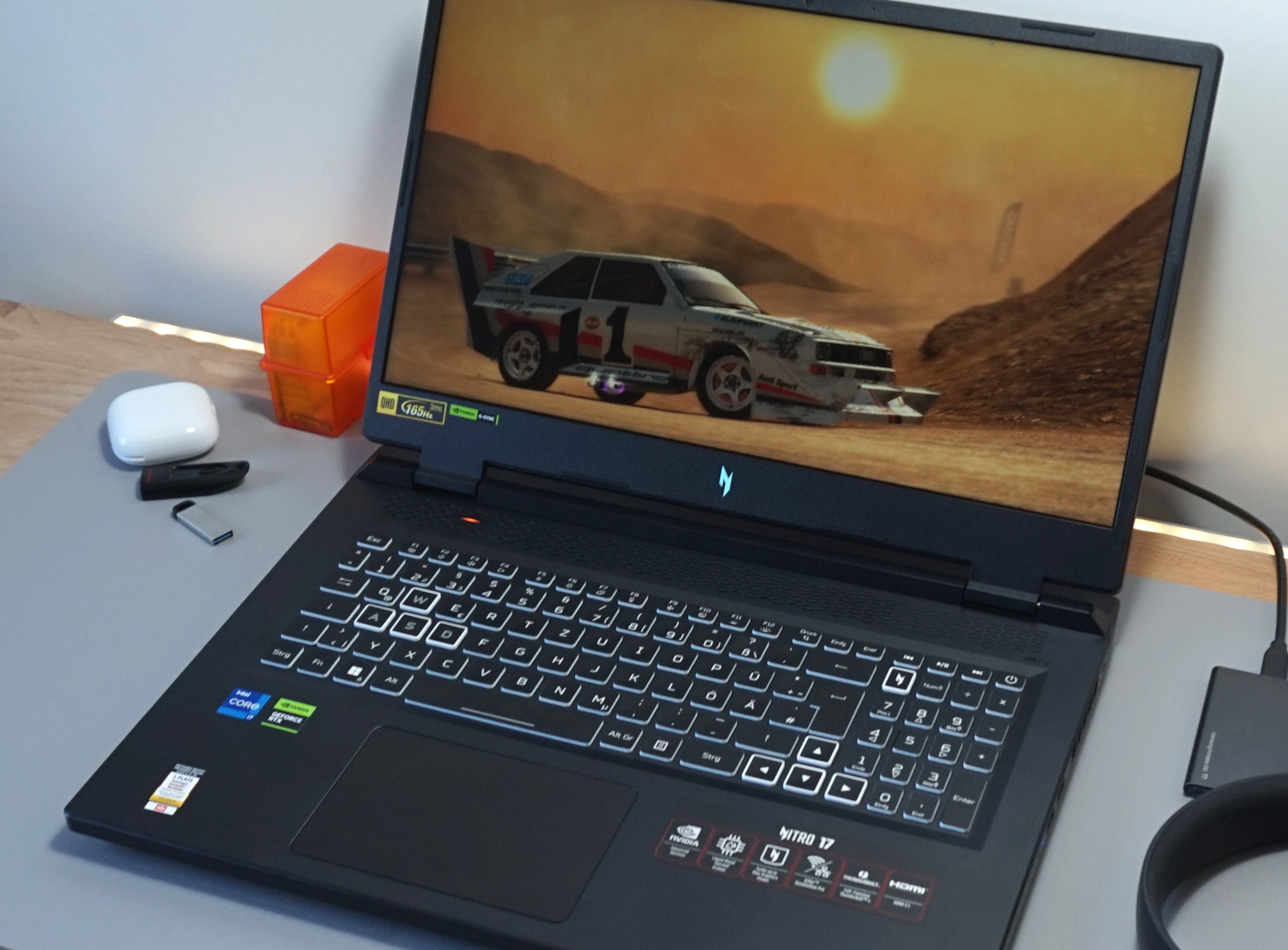

After previously testing a model with the Core i7-13700H and GeForce RTX 4060 , now we are taking a look at the laptop’s similarly priced brother, the AN17-41-R9LN with an AMD processor and a slightly more powerful GeForce RTX 4070 (also 8 GB GDDR6 VRAM). Similar to the Intel version, a 16:9 QHD panel with a refresh rate of 165 Hz and a resolution of 2,560 x 1,440 pixels is used as a screen. In addition, there are 2x 8 GB DDR5-4800 RAM and a 1 TB NVMe SSD installed.
There are also no surprises in its operating system with the laptop having Windows 11 Home installed. Competitors to the Nitro 17 include other 17-inch gaming laptops with an RTX 4070, such as the MSI Pulse 17 B13VGK , the Schenker XMG Focus 17 (E23) or the Asus ROG Strix G17 G713PI – all of which can be found in the tables as comparison devices. Since the device’s case is identical to its Intel counterpart apart from its connectivity options (the AMD variant doesn’t have a Thunderbolt 4 port and instead has 2x USB 4), we will not go further into its case, features and input devices in this article.
You can find the corresponding information in the review of the AN17-51-71ER . The AMD model features the same QHD display as the Intel version, which we welcome as a result of its good measurement results and picture values. Its IPS panel might not be the brightest at 337 cd/m² on average, but as long as you stay indoors, its brightness levels are fine.
Its reaction times, black value (0. 35 cd/m²) and contrast (1. 000:1) also prove to be no reason for the laptop to hide from its competitors – although, there is still a little room for improvement.
For a gaming laptop, its color spaces (100 % sRGB, 98 % P3 and 86 % AdobeRGB) are unusually good. Its color accuracy is good, too and doesn’t require much calibration. The laptop’s viewing angles are typical for an IPS panel, so quite good.
Unfortunately, our test device had a bit of a problem with screen bleeding along the edges of the display. Although the Ryzen 7 7735HS has to make do with the older Zen 3+ architecture (some 7000 models already rely on Zen 4), we would still count the Nitro 17 AN17-41-R9LN to the upper mid-range field. Its 16 GB RAM and 1 TB SSD are no longer a highlight in the year 2023, but they are still adequate.
Acer has pre-installed a tool called Nitro Sense, which can be used to make numerous changes to the system (e. g. the keyboard illumination).
The different performance modes are especially important for everyday use. Since no real frame rate increase could be determined from 3D applications onwards but the noise emissions increased significantly, we performed all measurements in the Balanced mode – which represents the sweet spot, so to speak. The fan control was always in automatic mode.
The Ryzen 7 7735HS is an octa-core processor which has 16 MB of L3 cache and can process up to 16 threads at once thanks to SMT. AMD has indicated the 6 nm model as having a clock rate of 3. 2 to 4.
75 GHz under load, which is neither little nor a lot. One of its biggest advantages is its comparatively powerful iGPU. During undemanding tasks (the device supports Advanced Optimus), only the Radeon 680M built into the processor is active – which can compete with older entry-level and partly also mid-range GPUs.
The Ryzen 7 7735HS did well but not exceedingly during the benchmarks. Its performance was (as expected) slightly worse than its (more expensive) Intel competitor, the Core i7-13700H, which features 14 cores and can process 20 threads simultaneously. Compared to a Core i9-13900HX or a Ryzen 9 7945HX with Zen 4 architecture, the 7735HS didn’t stand a chance and did quite a bit worse.
Even so, the CPU performance remained very consistent according to our Cinebench loop – this can’t be said for all other laptops. The laptop’s system performance was good enough for it to come in somewhere in the middle among the comparison devices. 7,240 points in PCMark 10 make this a nimble and all-round capable system.
The Nitro 17 has to accept criticism for its high latencies. According to the LatencyMon tool, the laptop is only conditionally suitable for real-time video and audio editing in its delivered state. The laptop is fitted with an NVMe drive from Samsung.
The PM9A1 model delivered very good results in the AS SSD benchmark as well as in its read and write rates. Unfortunately, its performance sank considerably after a while and then remained very unstable (see DiskSpd-Loop). The GeForce RTX 4070 from Nvidia’s Ada Lovelace generation takes care of complex graphics calculations.
Due to its limited RAM (8 GB GDDR6) and relatively narrow interface (128 bits), we would class this gaming laptop as an upper mid-range device and not a high-end one. The RTX 4070 has a TGP of 140 watts, which is the maximum for this graphics chip. Its benchmark results were relatively unspectacular, as the Nitro 17’s GPU performance is about the same as the RTX 4070 average.
Its performance win over the RTX 4060 model is limited, as can be seen in our table. The situation is similar when it comes to gaming. Here, too, its performance was similar to the previously determined average, and the RTX 4070 barely did any better than the RTX 4060 in some cases.
If you limit yourself to Full HD resolution, i. e. 1,920 x 1,080 pixels, even demanding games like Immortals of Aveum can be run at maximum details and can achieve at least 40 FPS.
Most games run at more than 60 FPS in FHD. The RTX 4070 is also strong enough for native QHD resolution with a few exceptions, and the display’s 165 Hz refresh rate is rarely utilized. We tested how the 3D performance behaved over a period of about 60 minutes with the help of The Witcher 3 (FHD/Ultra).
You can see from the table below that there were no frame rate drops. While noise emission levels were quite uncomfortable in Performance mode (54 dB) and Turbo mode (61 dB), the fans were still audible in Balanced mode (44 dB) but not uncomfortably so. This means we would recommend using this setting.
In idle mode, the 17-inch laptop generally behaves quite quietly. Either the fans are completely switched off or you can only hear a subtle whooshing noise. The fans rarely spin annoyingly fast.
The laptop’s temperatures are similar to those of its competitors. During the Witcher 3 gaming test, we noted a maximum of 46 °C on the top of the case and a maximum of 55 °C on the bottom. In idle mode, the whole case remains quite cool.
We mostly measured temperatures below 30 °C. The stress test using the tools Furmark & Prime95 ended with no nasty surprises. While the Ryzen 7 7735HS levelled at about 3.
3 GHz (but got quite warm at around 90 °C), the RTX 4070 made itself comfortable at 1,700 MHz and just over 80 °C. The laptop’s power consumption rates were as to be expected. 10 to 16 watts of idle consumption and 79 to 220 watts of load consumption could also come from a device with an i7-13700H.
We cannot understand why Acer includes a bulky 330-watt power supply with the laptop. A more compact 230-watt model would have done just as well. A 90 Wh battery capacity competes with its rivals from MSI (Pulse 17) and Asus (Strix G17).
Thanks to its powerful battery and built-in graphics switching, you would actually expect good runtimes from this laptop. Interestingly, the rates are significantly lower than those of the Intel counterpart. In our real-world WLAN test with the display brightness reduced to 150 cd/m², the AMD edition only lasted just under 5 hours instead of 8 (we suspect faulty or suboptimal power-saving mechanisms in battery mode).
For the most part, Acer’s Nitro 17 AN17-41-R9LN is an impressive 17-inch gaming laptop. Its combination of an AMD CPU ( Ryzen 7 7735HS ) and an Nvidia GPU ( GeForce RTX 4070 ) creates quite a nice harmony which is enough to run most games in its native resolution of 2,560 x 1,440 with maximum settings. Although, it isn’t the most future-proof as a result of its meagre 8 GB VRAM.
In many other ways, the manufacturer has delivered a good gaming laptop. Its connectivity options and input devices should be sufficient for most buyers. A colorful and relatively quick QHD display completes the setup.
The laptop’s noise emissions are, as always, highly dependent on which mode is in use. In our test, the “balanced” setting showed the best compromise between performance and noise. Acer could do with improving the Nitro 17’s case and sound quality a bit.
Its integrated 2. 0 system is missing a lot of bass. The laptop’s latencies and battery life (considerably shorter than on the Intel version) also prove to be issues which the manufacturer could do with resolving.
Despite its weaker CPU performance and barely better 3D performance compared to the RTX 4060 model based on Intel, we would still recommend going for the AMD model, as most games are known to be GPU-limited. An equal or slightly better alternative could be the Asus ROG Strix G17 G713PI which also features an RTX 4070 – but it also has a Ryzen 9 7945HX installed which is a more modern and considerably faster CPU. In turn, it also costs more.
The Acer Nitro 17 AN17-41-R9LN with a Ryzen 7 7735HS, GeForce RTX 4070 and a QHD display can be found on Amazon for around US$1,900. .
From: notebookcheck
URL: https://www.notebookcheck.net/Acer-Nitro-17-Ryzen-edition-review-The-QHD-gaming-laptop-with-an-RTX-4070.747918.0.html