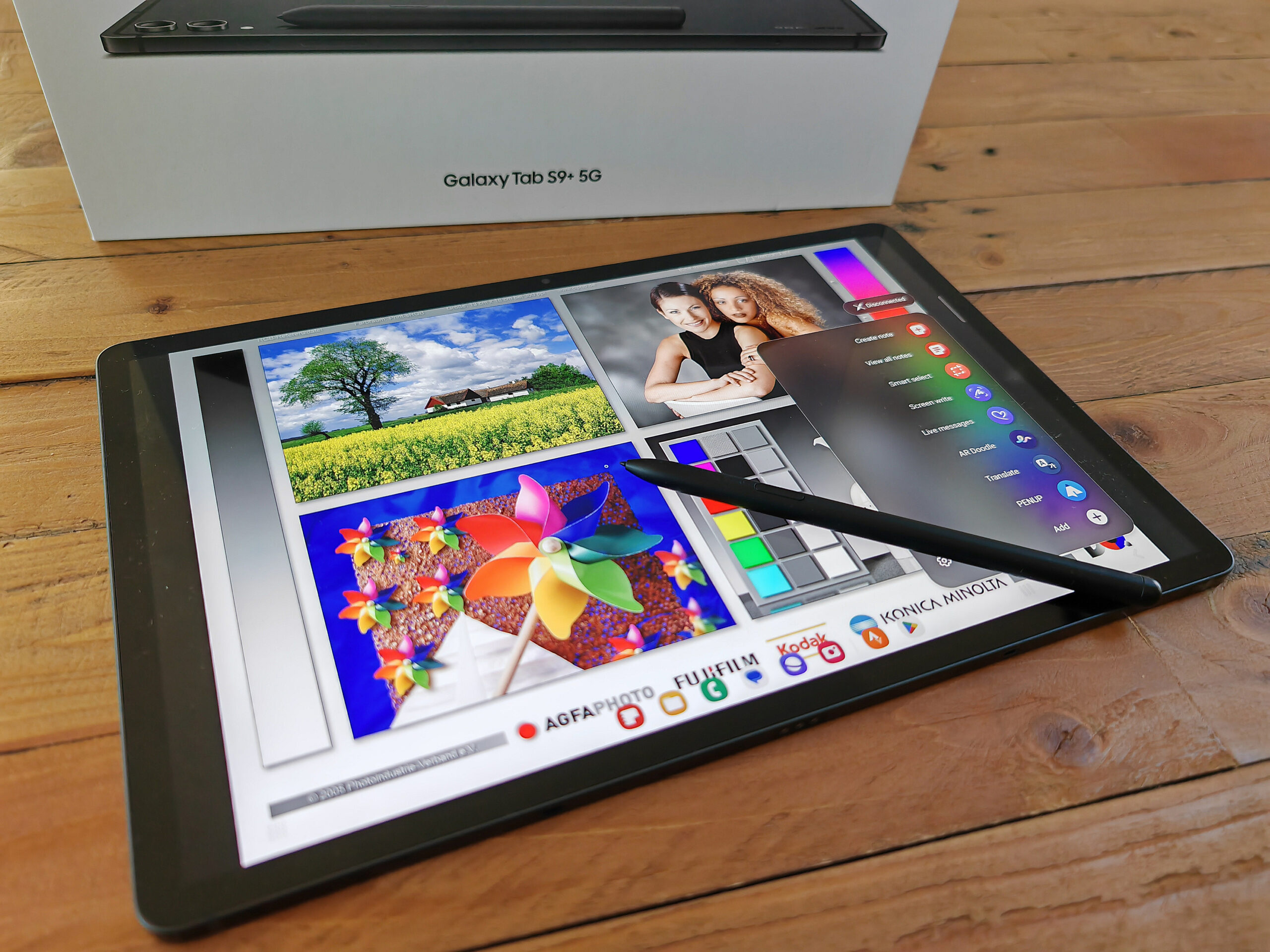

Samsung’s top tablets also deliver this year: We already tested the Samsung Galaxy Tab S9 and Tab S9 Ultra and liked both of them very much. With the Samsung Galaxy Tab S9+, we now also review the tablet that is placed between the two models mentioned above. It optionally offers more storage than the Tab S9 and at 12.
4 inches, also a larger display, but you also pay about 100 Euros (~$106) more. On the other hand, you save a significant amount compared to the Samsung Galaxy Tab S9 Ultra , while still getting a fast SoC, an AMOLED screen with a high resolution, and pen support. We now take a closer look at the middle model of the Galaxy Tab S9 series to find out whether all that also results in a good tablet.
The aluminum case of the Samsung Galaxy S9+ is protected from water and dust according to IP68. While you could theoretically also take the Galaxy Tab S9+ with you snorkeling under water, you shouldn’t go deeper than 1 meter (~3 ft) due to the water pressure. The tablet is available in two colors: dark grey and light beige, with the included S Pen being color coordinated.
Compared to the Samsung Galaxy Tab S8+ predecessor, the dimensions have hardly changed. The Galaxy Tab S9+ grew only minimally in terms of width and height, but at a thickness of 5. 7 mm (~0.
22 in), it is still a very slim tablet. Although the two cameras on the back stick out from the back significantly, Samsung still succeeded in preventing the tablet from wobbling when it is placed flat on a table. The display bezels on all sides are very slim at only 8 mm (~0.
3 in), giving the tablet very modern looks. At the same time, you can still hold it in your hands comfortably without always accidentally triggering the touch screen. The screen is protected by Gorilla Glass 5.
The tablet shows very good workmanship with rounded edges even at the material transitions, and it can hardly be warped. It also doesn’t produce any creaking noises when applying some pressure. Since the Samsung Galaxy Tab S9+ represents the middle option within the Galaxy Tab S9 family, it also gets the two middle versions in terms of the storage.
The following equipment versions are available, and we also list the official MSRP for each version: With Bluetooth 5. 3, it uses the most current Bluetooth technology. The USB-C port is specified as USB 3.
2 Gen 1, which due to the confusing labeling of the USB consortiums corresponds to USB 3. 0. This allows data transfer rates of up to 5 Gbit/s.
A DisplayPort function is also integrated, allowing you to easily connect an external monitor with the Galaxy Tab S9+ using an USB-C cable. NFC is not available. The 5G version of the tablet includes a Nano SIM slot and also supports an eSIM, making dual-SIM also possible in this way.
In contrast to many other expensive tablets, the Samsung Tab S9 series also includes a microSD card slot. This can be used in addition to the SIM card slot. The Samsung Galaxy Tab S9+ reaches approximately the same good speeds as its predecessor, as we could find out in the tests with our Angelbird V60 reference microSD card.
Android 13 is preinstalled on the tablet with an overlay of Samsung’s inhouse OneUI 5. 1. 1.
At the time of the test, the security patches are from August 2023, and with that, they are also fairly current. The manufacturer promises four large software updates, so the tablet should still receive Android 17. In addition, it is supposed to get quarterly security updates for 5 years, which is until 2028.
You don’t get a really pure system with Samsung, and many third-party apps are preinstalled, including some from commercial vendors such as Spotify or Netflix. In addition, Samsung also installs a bunch of its own apps, some of which also double the functions of the Google apps, such as its own browser or a messaging app. But fortunately many of those apps can be uninstalled easily, if you don’t like them.
Samsung DeX also allows you to use a desktop mode with optimized operation of the tablet via mouse and keyboard. In this way, you can also use the tablet as a laptop replacement. Wi-Fi 6E is the fastest Internet standard supported by the Samsung Galaxy Tab S9+.
In the tests with our Asus ROG Rapture GT-AXE11000 reference router, the tablet reaches fast transfer rates. According to the test results, a 1-Gbit Internet connection can be used to the fullest at all times. Loading and scrolling websites works very fast, and you also get full reception strength in close proximity to the router.
However, at a 10-meter distance (~33 ft) and through 3 walls, you only get a signal strength of 50%. This also becomes minimally noticeable in the speed of rendering web pages, although it is still lightning fast. The 5G version of the tablet supports many different frequency bands, allowing it to be used for mobile Internet also when traveling.
During our testing period, which lasts about 2 weeks, we keep testing the quality of the reception in various situations and are very pleased. The Samsung Galaxy Tab S9+ often also offers an acceptable reception in very difficult places. The locating module is available in both the 5G as well as the Wi-Fi versions of the tablet.
Although it works in combination with all the large satellite networks, it doesn’t support SBAS for more accurate locating. Indoors, it is difficult to get a satellite signal, so most of the time, the approximate location is determined using the Google services with the help of known WLAN connections. However, the moment you step outside, the satellite uplink works very quickly, and we are located with an accuracy of 3 meters (~10 ft).
But even then, the tablet doesn’t find a lot of satellites. For our practice test, we take the car this time. While the Galaxy tablet is able to approximately follow our route, at times it tends to locate us next to the road or shows us going through buildings or trees.
Even though we have seen this done significantly better before, the Galaxy Tab S9+ is still usable for navigation as long as your demands on the accuracy aren’t too high. If it is only for the cameras, you can save yourself the additional premium for the Samsung Galaxy Tab S9 Ultra , since the Galaxy Tab S9+ brings the same equipment aside from the more light-sensitive second front camera. For the main camera, there continues to be the 13-MP sensor that you already know from the Galaxy Tab S8 series.
For a tablet, the recordings of the lens are fairly good, but the mediocre light sensitivity can become a problem particularly in difficult light conditions. In daylight, on the other hand, you get a quite solid color and detail reproduction. Videos can only be recorded at 30 fps, regardless of whether you choose Full-HD or 4K as the resolution.
The autofocus and brightness adjustment work without any delays, resulting in videos that are fairly rich in detail under good light conditions. In addition, there is also an 8-MP wide-angle lens at the back. Unfortunately, you cannot use it for a hybrid zoom, but you can only switch directly between the two cameras in the back.
The wide-angle pictures are attractive, although they show only few details in the enlargement and appear slightly blurry in parts. While the front camera takes acceptable selfies, they look very grainy in the enlargement and show hardly any details in dark areas. We test the main camera again in our photo studio under predefined light conditions.
Under full studio illumination, the test chart looks very sharp, even in the areas at the edges. Under only a single lux of illumination, the object is still recognizable but looks very grainy. Although the slim box of the tablet is already exciting when buying it, making you look forward to the slim design, it also shows that the box of the Samsung Galaxy Tab S9+ doesn’t include a charger.
Aside from a USB cable and the SIM tool, the box only includes one other accessory, but that is a real highlight: the S Pen. The input pen can be attached magnetically to the Galaxy tablet into a groove on the back, where it is also getting charged. It is connected to the tablet via Bluetooth and can also be used for gesture input in this way.
In addition, there is a button on the pen that opens the quick access menu by default, but you can also use it for other functions in compatible apps. Even when its battery is empty, you can still use the input pen, but then you lose all the functions for which you need a Bluetooth connection. Samsung offers a 24-month warranty for its tablets.
If you expand the warranty to Samsung Care+, this will also protect the tablet in case of accidents or theft. Aside from the reliable and smooth operation using the input pen, the touchscreen of the Galaxy Tab S9+ can also be operated very accurately using your fingers. With the refresh rate of up to 120 Hz, inputs are implemented very quickly and smoothly.
Looking in landscape mode, the fingerprint sensor is integrated in the display on the right side of the tablet. The sensor area is easy to reach with your thumb, and the thumb print is recognized, even if the thumb is not placed exactly on the right spot. The sensor is able to unlock the display reliably and very quickly.
You also have the option to unlock the display using face recognition via the front camera. However, this is only 2D recognition that isn’t very safe, so we cannot exclude the possibility that third parties can manipulate it with a photo. The Samsung Galaxy Tab S9+ includes an AMOLED display with a 12.
4-inch diagonal and aspect ratio of 16:10. With 2,800 x 1,752 pixels, the Samsung tablet offers a fairly high resolution, causing the display contents to look very sharp and rich in detail. In terms of maximum brightness, the Tab S9+ produces an average of 551 cd/m² with a full white display, which is significantly brighter than the predecessor.
In small areas (APL18), even up to 900 cd/m² are reached, which is sufficient for decent display of HDR contents. At minimum brightness, we measure a continuous flickering of 120 Hz, which corresponds to the refresh rate of the screen. Samsung has probably adjusted the PWM frequency correspondingly here, to make life easier for more sensitive users.
However, before purchasing it, users who tend to get headaches with flickering screens should still take a look at the display, to make sure that it’s okay for them. In our measurements with the spectral photometer and the CalMAN software, we determine a fairly accurate color reproduction. Even if a minimal deviation is visible with pure white color, all the color values show a very good reproduction, which should allow you to use the screen to also evaluate print colors fairly reliably.
The response times are attractively low, and gamers or other demanding users should be able to use the display without any noticeable delays. Outdoors, the tablet turns out to still be fairly usable in daylight conditions, even though direct sunlight can become problematic. Regardless of the viewing angles, the display contents always remain easily recognizable.
In the graphics computations, Samsung’s tablet is also very fast, even still reaching 29 fps in the 4K benchmark of GFXBench. Applications in Full-HD resolution represent no problems at all for the SoC, and it can even reach significantly more than 120 fps. Again, the Apple iPad Pro 12.
9 2022 with Apple’s M2 shows an even higher performance, but the differences should only become noticeable in very demanding applications. When surfing the Internet, the Galaxy Tab S9+ also turns out to be extremely fast. Websites are loaded quickly, and most of the times, photos already become visible while scrolling.
Even more demanding web pages with extensive HTML-5 effects don’t slow down the tablet. Thanks to the UFS-4. 0 flash storage, there is no problem with speeds here either.
Quite the opposite, the high transfer rates that are in parts twice as fast as in other tablets allow for fast load times and smooth data transfer. You can still have some fun with the Galaxy Tab S9+ even if you don’t use it for work. The gaming capabilities of the high-quality tablet turn out to be quite formidable.
In low settings, PUBG Mobile reaches very smooth 90 fps and even a UHD resolution is possible at 40 fps. In Diablo: Immortal , 60 fps can be reached without any problems even in maximum settings. The operation responds immediately and very accurately.
However, the large display isn’t very well suited for smaller hands. Under maximum load, the tablet warms up slightly up to a maximum temperature of 41. 4 °C (106.
5 °F). But this warming is locally limited, and even though it is noticeable, it is not critical. However, the SoC still throttles after longer load, as we can see in the 3DMark stress tests.
After 20 runs of the benchmark, the performance drops by up to 23%. But with the high performance level of the tablet, this should hardly be noticeable in everyday operation. The Samsung Galaxy Tab S9+ includes a total of four speakers, allowing for some stereo effects, if you use the tablet in landscape mode.
The speakers can get fairly loud. They produce balanced highs and mids, and you can even hear some bass frequencies from time to time. Music sounds very spacious coming from the four speakers.
The sound in movies can be very detailed, even leading to goose bumps in some cases. External speakers of headphones can be connected via USB-C and Bluetooth, both of which work without any problems. Only the selection of the supported Bluetooth codecs is limited particularly for HiFi sound, with SBC, AAC, aptX, LDAC, and Samsung’s lossless codec being the available options.
We already saw in the power consumption that the Galaxy Tab S9+ doesn’t run very efficiently. The 10,090-mAh capacity battery only results in mediocre runtimes, although at least they turn out significantly better than those of the Galaxy Tab S8+ predecessor. 9:44 hours in the WLAN test is an acceptable value, but the Xiaomi Pad 6 also shows that you can get a much better battery life even from a significantly smaller battery.
According to our measurements, you should be able to play games for 6 hours with a full battery charge. With almost 11:33 hours when playing videos from the hard drive with the WLAN turned off, you might almost be able to watch the extended editions of all three Lord of the Rings movies in one stretch. As already the Galaxy Tab S9 and the Tab S9 Ultra , the Samsung Galaxy Tab S9+ is also a very good high-quality tablet that is able to impress with its extremely fast processor, the good camera equipment, the included pen, and the high-quality speakers.
The display is bright enough for HDR content and offers a good color reproduction. In the gaming arena, the tablet is also able to score with up to 90 Hz in PUBG Mobile . The fast UFS 4.
0 storage is an area where the Tab S9+ is able to distinguish itself from other high-end tablets, with hardly any other manufacturer offering similarly fast storage. The WLAN is fast, and the 5G version allows you to access the mobile Internet with a reliable reception or even make phone calls. But there are also some areas where Samsung could still make some improvements: First of all, this goes for the efficiency, since considering the fact that the tablet includes a powerful battery, the battery life still turns out fairly mediocre.
Considering the high price, it is also questionable that the box doesn’t include a charger, and the locating could also be more accurate. While the cameras do a decent job, they also could have offered more in such a high-priced tablet. Samsung’s Galaxy Tab S9+ is a high-quality 12.
4-inch tablet with an extremely high performance, good display, and great sound system. The efficiency leaves some room for improvement. If you are content with a slightly smaller tablet, you could also save 100 Euros (~$105) with the Galaxy Tab S9 .
Those who are not averse to Apple’s operating system could get an even faster tablet with the Apple iPad Pro 12. 9 . The Samsung Galaxy Tab S9+ is currently on sale directly from the manufacturer with 512 GB of storage for $999.
The tablet is also available for example on Amazon starting from ~$954 , with the 5G version starting from $1,149. .
From: notebookcheck
URL: https://www.notebookcheck.net/Samsung-Galaxy-Tab-S9-Plus-5G-review-Expensive-high-quality-12-4-inch-tablet.759099.0.html