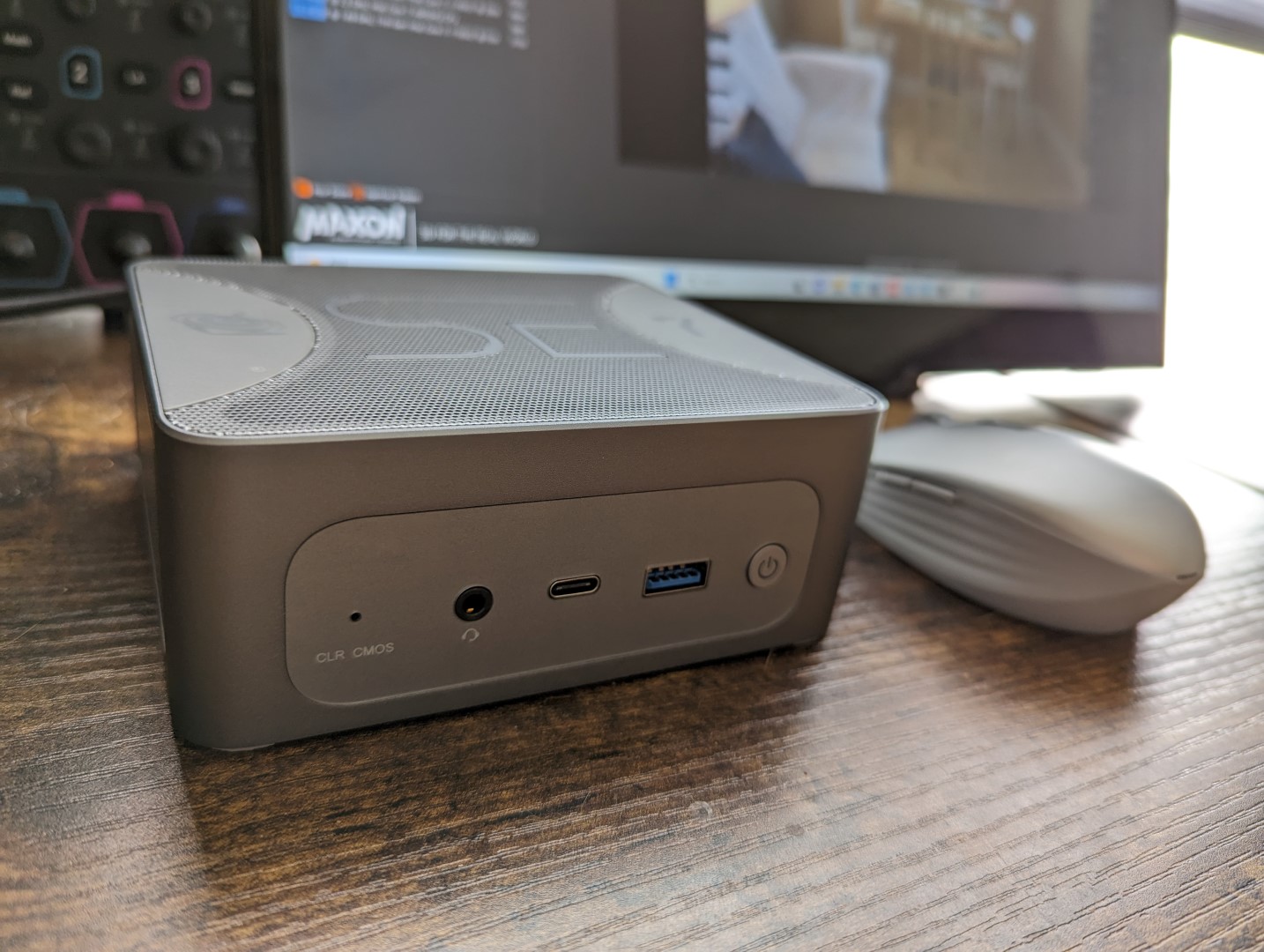

The SER7 is the latest mini PC from Beelink designed to succeed the older SER6 series. The model sports an updated chassis design when compared to its older siblings as well as newer AMD Zen 4 CPUs Our review unit comes with the Ryzen 7 7840HS, 32 GB RAM, and 1 TB SSD for approximately $730 USD. There are currently no other configurations at the moment or even a barebones option.
Alternatives to the SER7 include other small mini PCs like the Lenovo IdeaCentre Mini , Intel NUC 13 Pro , or the Minisforum Venus NPB5 . The Beelink SER series is distinct from the GTR series which consists of larger mini PCs with higher-end Ryzen 9 options. More Beelink reviews: Beelink has dropped the removable top covers on older models in favor of a more fixed look and construction.
The matte metal and ABS plastic surfaces are firm on each side including on the many ventilation grilles surrounding the unit. The SER7 is not a cheaply made or overlay plastic mini PC in any sense of the word. The unit is both heavier and thicker than older Beelink SER or SEI models due to the new integrated vapor chamber.
It’s not as large as the GTR or GTI series, but the size increase is nonetheless noticeable when compared to traditional Intel NUCs. The SER7 addresses one of our main complaints about older Beelink models by integrating multiple USB-C ports instead of only one. In fact, the system includes three USB-C ports which is more than what most other mini PCs offer.
Two of the USB-C ports are also USB4 meaning eGPUs are fully supported. The dual 3. 5 mm headphone jacks are also notable for more expansive audio support.
Note that USB-C Power Delivery is supported up to 100 W meaning you can use third-party USB-C AC adapters to power unit should you ever lose the proprietary AC adapter that ships with the box. However, the model appears to be picky with which USB-C AC adapters are supported. For example, our 130 W USB-C AC adapter from Dell would not power on the SER7 at all while our 140 W USB-C AC adapter from Lenovo would work without any issues.
There is no Kensington lock unlike on the Intel NUC series. For one reason or another, Beelink is still shipping its fastest mini PCs with last generation Wi-Fi modules. The Intel AX200 in our unit does not support Wi-Fi 6E unlike on the Intel NUC 13 Pro which ships with the newer Intel AX211.
While Wi-Fi 6E isn’t always faster than Wi-Fi 6, it still provides lower latency to improve common HTPC applications like game streaming via cloud. Servicing requires more steps than on an Intel NUC. Firstly, the bottom is secured by four Phillips screws and removing it reveals the fan bracket and secondary SSD slot as shown by the image below.
Then, an additional set of screws must be removed from the fan bracket to reveal the motherboard underneath. The screws are of different lengths and it is important to not mix them up during reassembly. The vapor chamber is on the other side of the motherboard facing upwards.
Beelink discourages access to this side of the board. The retail box includes a wall-mounted VESA bracket with screws, AC power adapter, and two HDMI cables. The AC adapter is unique when compared to other manufacturers as it attaches magnetically to the bottom of the SER7 to prevent accidental disconnects.
We set out unit to Performance mode via Windows prior to running the benchmarks below. Beelink includes no control center-like software for toggling any special features. Ryzen 7 7840HS performance is excellent with multi-thread results that are roughly 10 percent faster than the competing Core i7-13700H to easily outperform any Intel Core U or Core P processors currently available by relatively wide margins.
Users demanding more performance will have to look at Core i9-13900K or Ryzen 9 7945HX solutions, but such processors are well beyond the power envelope of our HS-series CPU. Performance stability is also excellent and better than most mini PCs powered by Core U or Core P CPUs. Processor performance in the Intel NUC 12 Pro , for example, would dip by about 20 percent over time when running CineBench R15 xT in a loop whereas our Beelink would remain flat throughout.
This can be partly attributed to the vapor chamber cooler of the SER7 design. PCMark scores are some of the highest of any mini PC with no discrete GPU. Even the larger and heavier Lenovo IdeaCentre Mini Gen 8 trails behind our AMD Zen 4 solution.
LatencyMon reveals no major DPC issues when opening multiple browser tabs of our homepage. Unfortunately, 4K video playback at 60 FPS is problematic with 55 dropped frames recorded within a 60 second timespan. The CPU and GPU are more than capable of 4K60 video playback and so this suggests underlying driver issues with the SER7.
The dropped frames manifest as occasional stutters during 4K60 video streaming. Perhaps unsurprisingly, the SER7 ships with the same Crucial P3 Plus CT1000P3PSSD8 NVMe SSD as found on other models from the same manufacturer including the GTR7 . Transfer rates, however, are slower than expected in regards to write performance even after multiple retests.
DiskSpeed shows poor performance when it comes to q8 t1 and 4k q1 t1 blocks. Graphics performance is about 10 to 20 percent faster than the Radeon 680M in the older SER6 Pro. The advantages are greater when running DX12 titles than on DX11 and so it is recommended to enable DX12 when possible.
The Radeon 780M GPU makes the competing Iris Xe 96 EUs look like old technology with performance levels that are 40 to 75 percent faster than the Intel solution. The Radeon 680M was the fastest integrated GPU solution for gaming when it launched last year and the new Radeon 780M is even faster. The SER7 is able to run modern titles like F1 22 at 1080p and low to low-medium settings while maintaining performance levels close to 60 FPS.
More demanding titles like Cyberpunk 2077 require lower settings in order to maintain frame rates above 30 FPS, but native 1080p is nonetheless possible. Keep in mind that FreeSync is supported and it’s highly recommended since the Radeon 780M will often run games in the 45 to 60 FPS range. The cooling solution consists of two fans: one larger one atop the vapor chamber and another smaller one for the SSD and motherboard.
Fan noise generally hovers around the 29 dB(A) range against a silent background of 25 dB(A) when running undemanding loads which is barely noticeable. The most important part is that the internal fans do not pulse as readily as on older Beelink models and so any changes to RPM are gradual instead of sudden. This behavior is preferable as fans that speed up and slow down too very quickly tend to be more audible.
Running demanding loads like Witcher 3 would induce a fan noise of 35. 6 dB(A) which is louder than on the larger IdeaCentre Mini. This can rise to the mid 40 dB(A) range if gaming for extended periods to be similar to many gaming laptops.
The system thankfully never reaches such high highs if used primarily for streaming purposes. We’re able to notice slight coil whining on our unit, but it is not loud enough to be bothersome. Surface temperatures can be as warm as 60 C when running high loads like games, but the hot spots are only toward the rear near the ventilation grilles as shown by the heat maps below.
The rest of the mini PC remains relatively cool with fresh air entering from the top. It’s not recommended to place any items on top of the unit due to how the cooling solution works. Other mini PCs like the NUC 11 or IdeaCentre Mini draw fresh air from the sides instead in contrast to our Beelink.
The CPU would boost to 4. 1 GHz and 54 W when initiating Prime95 stress. It is able to maintain this rate and at a stable core temperature of 77 C with no major throttling issues.
This is notable as other mini PCs, such as the Lenovo IdeaCentre Mini, may throttle to lower clock rates over time when subjected to the same stress test. The integrated GPU would stabilize at around 2526 MHz and 64 C compared to 2025 MHz and 86 C on the older but smaller SER6 Pro . Thus, the SER7 runs both faster and cooler than its immediate predecessor.
The overall high power consumption of the SER7 reflects its fast performance. When running Witcher 3 to represent typical gaming loads, for example, the Beelink would demand over 2x the power as a Dell Latitude 9330 running on the slower 12th gen Core i7-1265U CPU. Graphics performance-per-watt is still very good nonetheless since the Radeon 780M is significantly faster than the less demanding Iris Xe 96 EUs.
Processor performance-per-watt is excellent and it’s one of the key highlights of Zen 4. When running CineBench R15 xT, for example, our Ryzen 7 7840HS would complete the benchmark at about the same time as the Core i7-13700H in the Lenovo IdeaCentre Mini while consuming around 35 W less. We’re able to measure a maximum draw of 95 W from the small (~7 x 7 x 3 cm) 100 W wall wart AC adapter when the CPU is at 100 percent utilization.
This can prove to be problematic if attempting to power multiple external USB-C devices simultaneously and so a larger 120 W or 130 W AC adapter would have likely been more appropriate to better support both the mini PC and any connected accessories. The SER7 is the upgrade we wanted to see after the disappointing SER6 Pro. It brings about significant performance boosts to the already fast Zen 3+ series and it puts a lot of pressure on other mini PCs in terms of size and performance-per-watt particularly those powered by Intel Core U, P, or H CPUs.
The fact that it supports USB4 and external GPUs also addresses one of the key drawbacks of AMD CPUs versus Intel. The increase in performance over older models comes with an increase in thickness and weight. It’s fortunately not that much larger especially since length and width remain the same as before.
If you’re placing the unit on a desk, for example, the taller height of the SER7 shouldn’t be an issue. The SER7 is one of Beelink’s best mini PCs to date, but it’s also one of the company’s most expensive. For future models, we’d love to see Wi-Fi 6E and tool-less servicing or easier access to the SODIMM slots and primary M.
2 drive. Again, this is only a minor complaint as RAM and SSD upgrades are generally infrequent. The buggy SSD write performance and imperfect 4K60 video playback, however, should absolutely be addressed.
As one of Beelink’s fastest mini PCs, the SER7 also commands one of the highest price points at $700 to $800 USD. Other mini PCs like the Ace Magician or SER6 can be found for half the price or less. They may come with slower H or U series CPUs and less RAM and storage, but they are still more than sufficient for HTPC tasks and faster than any Atom or Celeron solution.
Thus, users will have to value the Zen 4 CPU, Radeon 780M GPU, and USB4 benefits of the SER7 to really make its higher price worthwhile. Amazon is now shipping the Beelink SER7 as reviewed for $800 USD. Alternatively, users can purchase directly from Beelink at a lower price.
.
From: notebookcheck
URL: https://www.notebookcheck.net/Beelink-SER7-mini-PC-review-Ryzen-7-7840HS-with-vapor-chamber-cooling.745786.0.html