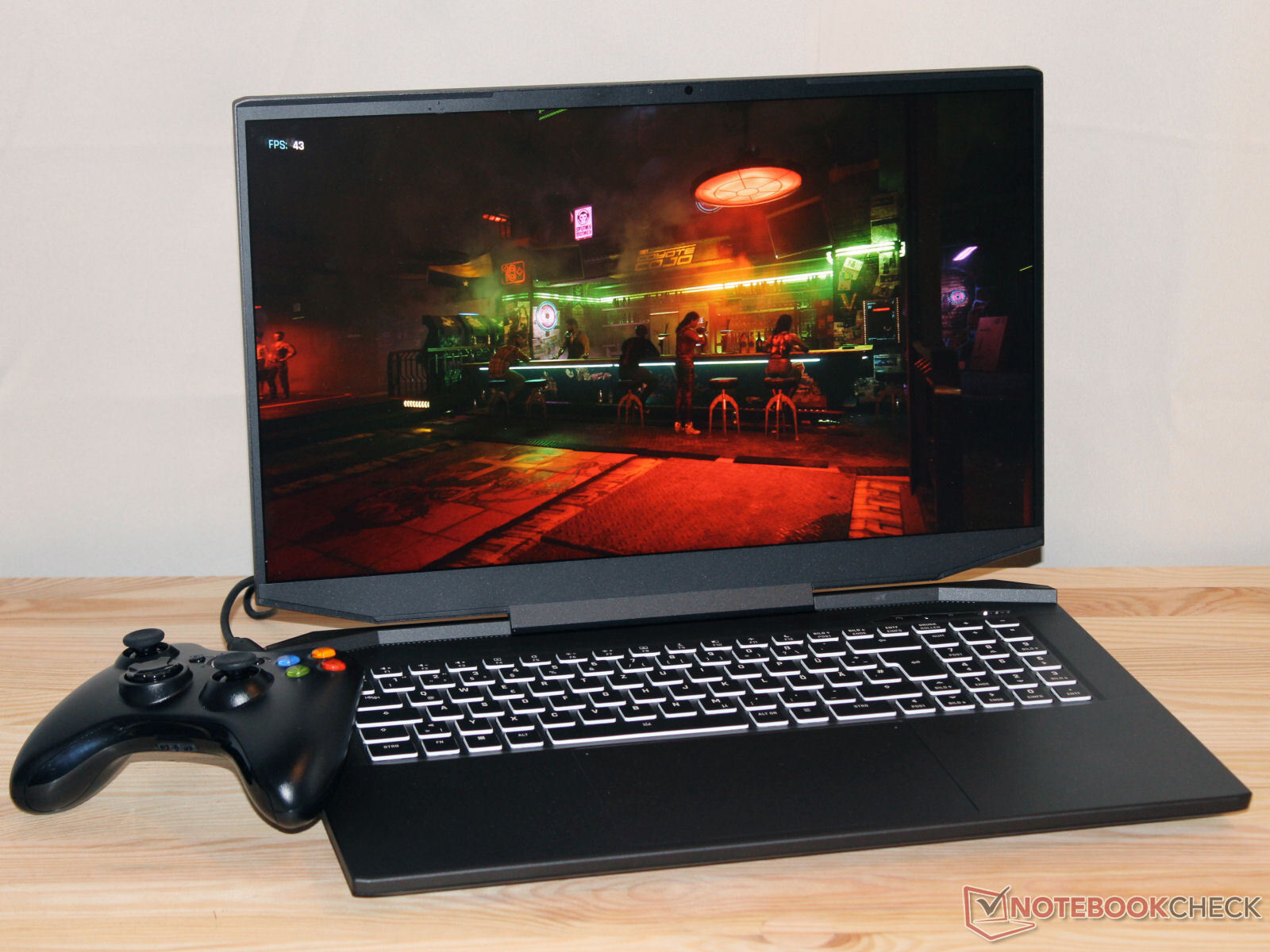

The XMG Apex 17 (late 23) is a mid-range, QHD gaming laptop based on a TongFang barebone (GM7XG0) and is available in this variant for just under 1,800 euros. The package consists of a Ryzen 7 7840HS , GeForce RTX 4060 (alternatively: RTX 4050 ), 32 GB of RAM and a 1 TB SSD. Competition can be found in the form of the Acer Nitro 17 AN17-51 , the Alienware m16 R1 , the Lenovo Legion Pro 5 16IRX8 , the MSI Katana 17 B13VFK , and the Medion Erazer Defender P40 .
The matte-black case has smooth surfaces (except for the base unit) and no flashy design features. LED light elements are not present – with the exception of the key lighting. Schenker has opted for a mix of materials: The rear of the aluminum lid is also complemented by plastic components.
After dismantling the base unit, the battery (screwed, not glued) as well as the usual hardware, are all exposed. Manufacturing flaws are not noticeable and the gap dimensions are good. The lid and base unit can be twisted slightly but all within an acceptable range.
Any pressure exerted on the lid doesn’t lead to image distortions. The hinges keep the lid securely in place but wobble somewhat. The maximum opening angle sits at 140 degrees.
Opening the laptop one-handed is possible. The XMG computer is the lightest and most compact among the competing 17. 3-inch laptops.
Tipping the scales at around 2. 5 kg, it generally belongs to the lightest representatives of its kind. The Apex has three USB-A ports (1x USB 2.
0, 2x USB 3. 2 Gen 1) and a USB-C port (USB 3. 2 Gen 2) at the ready.
The latter can neither output a Displayport signal nor does it offer Power Delivery support. Two video outputs (HDMI 2. 1, DP 1.
4a), audio jacks and a Gigabit Ethernet port round off the package. The video outputs, power connector and LAN port can be found on the rear of the device. Their corresponding cables would run to the rear and therefore not get in the way.
With a maximum transfer speed of 35 MB/s (transferring 250 jpg image files, at around 5 MB each) and 36 MB/s (copying large data blocks), the memory card reader (reference card: AV PRO microSD 128 GB V60) belongs to the slow models. In this regard, the competition offers more. Under optimum conditions (no Wi-Fi devices nearby, a short distance between the laptop and the server PC) it is possible to achieve good to very good Wi-Fi data speeds.
The Schenker laptop uses a Wi-Fi 6E chip (Intel AX200). A Realtek controller (RTL8168/8111; 1 GBit/s) takes care of wired connections. Quality-wise, the webcam delivers (2.
1 MP, max. 1,920 x 1,080 pixels) standard fare. A color deviation of around 8.
7 (target: DeltaE < 3) is quite decent. The camera doesn't offer a mechanical shutter. In addition to the usual documents, the laptop comes with a USB stick (drivers, software), a key ring including a bottle opener and a large mousepad.
After dismantling the base plate, the hardware becomes accessible. The first step on this journey is presented by the removal of the hinge covers (above the air vents). These are only slotted in and not screwed on.
Following this, the removal of all of the screws on the bottom of the device means the base shell can be separated from the rest of the device by using a thin spatula or a plectrum. This then allows access to memory banks (both occupied), the SSD (PCIe 4, M. 2 2280), the second SSD slot (PCIe 4, M.
2 2280), the Wi-Fi module, the BIOS battery, the fans and the battery. The basic warranty is for two years – including a pick-up service and six months quick repair (repair within 48 hours). In Germany, the asking price for a 36-month warranty is from 80 to 119 euros – depending on the selected quick repair time period.
The backlit, chiclet keyboard’s (RGB) flat, smooth keys enjoy medium key travel as well as having a distinct pressure point and nice resistance. When typing, the keyboard doesn’t yield. All in all, you get a keyboard fit for everyday use.
A substitute mouse is provided by the Clickpad (around 15. 4 x 10 cm) that has short travel and a clear pressure point. A tap on the LED in the top left-hand corner switches the entire pad either off or on.
A tap on the LED in the top right-hand corner switches the right side of the pad off or on. The responsive, 16:9 aspect ratio 240 Hz panel displays no PWM flickering, regardless of the brightness setting. The matte, 17.
3-inch screen’s brightness and contrast (2,560 x 1,440 pixels) meet their respective goals (> 300 cd/m² and 1,000:1). In addition to the review device’s QHD display, Schenker offers the Apex 17 with an alternative FHD (1,920 x 1,080 pixels, 144 Hz, IPS) panel. Out-of-the-box, the display demonstrates good color reproduction.
With a deviation of around 2. 2, the target value (DeltaE < 3) is achieved. A calibration reduces the deviation to 1.
2 and ensures balanced gray scales. The panel covers the sRGB color space almost entirely but not the AdobeRGB and DCI P3 color spaces. Most of the competing device’s displays paint a similar picture.
Only the Nitro 17 ‘s display covers the P3 color space. The IPS panel has good viewing angle stability and is legible from every position. Outdoors, the screen is legible as long as the sunlight isn’t too bright.
The Schenker Apex 17 is a mid-range QHD gaming laptop with its computational power being provided by Phoenix and Ada Lovelace. The laptop be custom-configured and purchased on Bestware. com .
Our review device can be had for 1,750 euros with prices starting at around 1,200 euros. The Apex offers three manufacturer-specific performance modes (see table) which you can switch between via a separate key (next to the power button). A status LED indicates which mode is active.
We used the “enthusiast” (benchmarks) and “balanced” (battery tests) modes. Optimus was active. The preinstalled Control Center enables individual profiles: This makes adjusting, for example, the CPU’s power limits, the GPU’s TGP and/or the fan control possible.
The Ryzen 7 7840HS APU (Phoenix, Zen 4) offers 8 CPU cores with a total of 16 threads at a maximum clock speed of 5. 1 GHz (one core). The CPU acknowledges continuous multi-thread load (CB15 loop) with a consistently high turbo speed – irrespective of the selected performance mode.
In mains operation, the benchmark results are around the CPU average. In battery mode, the more relevant single-thread performance (216 points) drops to a lesser extent than the multi-thread performance (1,715 points). Note: More detailed informationen concerning the Zen 4 architecture can be found in this related analysis article .
The smooth running system is designed to handle performance-hungry use case scenarios such as rendering and gaming – the good PC Mark results confirm this. The RAM’s transfer rates are on a normal level for DDR5 5600 RAM. The standardized Latency Monitor test (surfing the internet, 4k video playback, Prime95 high load) didn’t reveal any abnormalities.
The system seems to be suitable for real-time video and audio editing. Future software updates could either improve or worsen this performance area. The Apex can accommodate a total of two PCIe 4 SSDs in the M.
2 2280 format. RAID-0/1 is supported. The review device provided to us has a Samsung 1 TB SSD (PCIe 4, M.
2 2280) on board that delivers excellent transfer speeds. Positive: Thermally-related throttling did not occur. The GeForce RTX 4060 offers 3,072 shaders, a 128-bit wide bus and fast GDDR6 RAM (8,192 MB).
Schenker has set the maximum TGP to a value of 140 watts (115 watts + 25 watts of dynamic boost) – more is not possible. According to the Witcher 3 test, the TGP is not maxed out. The benchmark results are higher than the previous RTX 4060 average.
The dGPU mode does not result in any increase in performance. The switch between dGPU and Optimus requires a reboot – Advanced Optimus is not supported. The Schenker computer is designed for QHD gaming at high to maximum settings.
Higher resolutions would be usable at sometimes reduced settings when connected to an appropriate monitor. Frame rates typical for the RTX 4060 average can be achieved. Generally, the dGP mode does not result in an increase in performance.
Only in the game “X Plane 11” was a 10 to 20 percent frame rate increase recorded. In order to check whether the frame rates remained mainly consistent over a longer period of time, we ran the game “The Witcher 3” for around 60 minutes at Full HD resolution and maximum quality settings. The game character was not moved.
We didn’t notice a dip in the frame rate. Generally, we rate the Apex as having low to moderate noise levels. In everyday use, (office, internet, banking,.
. . ) the fans often spin slowly or even stand still.
They also lie low under medium load. This is different in the area of gaming: The sound pressure levels can rise to 54 dB(A) (“overboost”). In “enthusiast” mode, at 50 dB(A), the noise levels can be described as quite low.
The “balanced” mode is considerably quieter: however, a level of 34 dB(A) results in a significant loss in GPU performance. The fans primarily emit a sonorous noise. Annoying background noises are imperceptible.
The stress test and the Witcher 3 test caused the laptop to warm up noticeably in certain places. However, everything is still with acceptable dimensions. In everyday use (office, internet) the case temperatures remain in the green zone.
The stress test (Prime95 and Furmark in continuous operation) represents an extreme scenario that allows us to check the system’s stability under full load. The CPU ran throughout the test with clock speeds of 3. 8 to 3.
9 GHz and the graphics cores operated from 2. 2 to 2. 4 GHz.
The stereo speakers produce decent sound but lack bass. For a better sound experience, we recommend the use of headphones or external speakers. Worthy of praise: Among its comparison devices, the Apex 17 is the most economical laptop.
All in all, the competitors have much greater power requirements. The stress test und Witcher 3 ran with consistent power consumption. The PSU (230-watt) is suitably-sized.
In the Wi-Fi test (using a script to load websites) and video test (Big Buck Bunny short film (H. 264 coding, FHD), the 17. 3-inch device achieved runtimes of 5.
06 and 6. 51 hours, respectively. During the tests, the laptop’s energy-saving functions were deactivated and the display brightness was set to around 150 cd/m².
In addition, the video test was carried out with the radio modules switched off. Although the Apex possesses a relatively low battery capacity, it manages very respectable runtimes. The computer leaves some of the larger battery competitors in its trail.
Das Apex 17 fulfils its intended tasks (QHD gaming, rendering, video editing) without difficulty – The Ryzen 7 7840HS and GeForce RTX 4060 make it possible. Both chips can run at consistently high clock speeds. With the XMG Apex 17 (late 23), Schenker has delivered a well-rounded, mid-range, QHD laptop.
The computer doesn’t produce much noise in everyday use, but, when gaming, it is possible to strike a compromise between performance and noise by selecting the appropriate profile. A real-life battery runtime of around 5 to 7 hours – when measured against the battery capacity – is perfectly acceptable. The battery cannot be charged via the USB-C port (USB 3.
2 Gen 2). The laptop offers space for two PCIe 4 SSDs (M. 2 2280).
RAID 0/1 is supported. The Schenker online store allows you to select your preferred SSD or SSDs. The review device is equipped with a blazingly fast PCIe 4 SSD (1 TB).
Overall, the installed QHD display (17. 3-inch, 2,560 x 1,440 pixels, sRGB, IPS, 240 Hz) made a good impression. Alternatively, a cheaper, FHD panel is available.
The Medion Erazer Defender P40 would be an alternative with comparable performance and specs. Unlike the Apex, the P40 has a Thunderbolt 4 port on board. Notebookcheck.
com will soon be publishing a review of the 15. 6-inch sister model, the XMG Apex 15 (late 23) in a variant with a Ryzen 7 7840HS and a GeForce RTX 4050 . A variant similar to our review device (16 instead of 32 GB RAM) is available for 1,739 euros at Notebooksbilliger.
de . They also offer a cheaper, entry-level model with a GeForce RTX 4050 for 1,399 euros. Alternatively, it’s possible to custom configure your own device on the Schenker online shop .
.
From: notebookcheck
URL: https://www.notebookcheck.net/XMG-Apex-17-late-23-review-a-QHD-gaming-laptop-with-an-RTX-4060.757651.0.html